Understanding how to use a tripod for video is essential for creating smooth, professional-looking footage. Proper stabilization not only improves video quality but also allows for more precise camera movements and framing, elevating your production standards.
This guide explores various aspects of tripod use, including selecting the right equipment, setting it up effectively, and employing techniques to maximize stability and control during filming. Whether you are a beginner or an experienced videographer, mastering tripod usage is a fundamental skill for better video results.
Overview of Using a Tripod for Video
In video production, ensuring the stability and clarity of footage is fundamental to achieving professional-quality results. A tripod serves as an essential tool in stabilizing your camera or smartphone, preventing unwanted shakes and vibrations that can detract from the viewer’s experience. By providing a steady base, tripods enable creators to focus on framing, composition, and smooth movements, significantly enhancing overall video quality.
Whether shooting a cinematic scene, recording an interview, or capturing a steady time-lapse, the right tripod can make a marked difference in the final output.
There are various types of tripods designed to accommodate different scenarios and equipment types. The most common are lightweight tripods for quick setup and portability, versatile tripod heads for flexible shot adjustments, and heavy-duty tripods suitable for professional filming. Choosing the appropriate tripod depends on your specific needs, including the weight of your camera gear, the shooting environment, and the level of stability required.
Comparison of Different Tripod Types
| Feature | Lightweight Tripods | Professional Tripods | Mini Tripods / Tabletop | Specialized Tripods (e.g., Monopods, Fluid Heads) |
|---|---|---|---|---|
| Weight | Below 2 kg (4.4 lbs) | 4-8 kg (8.8-17.6 lbs) | Under 1 kg (2.2 lbs) | Variable; often lightweight but designed for specific purposes |
| Height Adjustment | Typically up to 1.5 meters (5 feet) | Adjustable from about 0.5 meters to over 2 meters (1.6 to 6.6 feet) | Fixed or limited to around 30-50 cm (1.6 feet) | Depends on type; monopods are adjustable but offer less stability |
| Ideal Use Cases | Vlogging, quick setups, travel filming | Studio shoots, cinematic productions, professional interviews | Product shots, tabletop filming, casual use | Sports, dynamic filming, specialized camera movements |
| Cost Range | $30 – $150 | $200 – $1,000+ | $20 – $80 | Varies widely depending on type and quality |
Choosing the right tripod hinges on balancing portability, stability, and functionality. For instance, a lightweight tripod is invaluable for on-the-go videographers capturing outdoor scenery or travel vlogs, where quick setup and mobility are priorities. Conversely, professional filmmakers working on cinematic projects may prefer robust tripods with advanced head mechanisms, allowing precise control over camera movements. In many scenarios, combining different tripod types or accessories enables videographers to adapt to complex shooting conditions effectively.
Examples of situations where tripod use is critical include filming interviews in controlled environments to minimize shaking, capturing long exposure night scenes where stability ensures clarity, or steadying a camera during time-lapse sequences that require consistent framing over extended periods. Proper tripod selection and usage thus directly influence the clarity, professionalism, and overall quality of video content, making it an indispensable element in any serious videographer’s toolkit.
Selecting the Right Tripod for Video
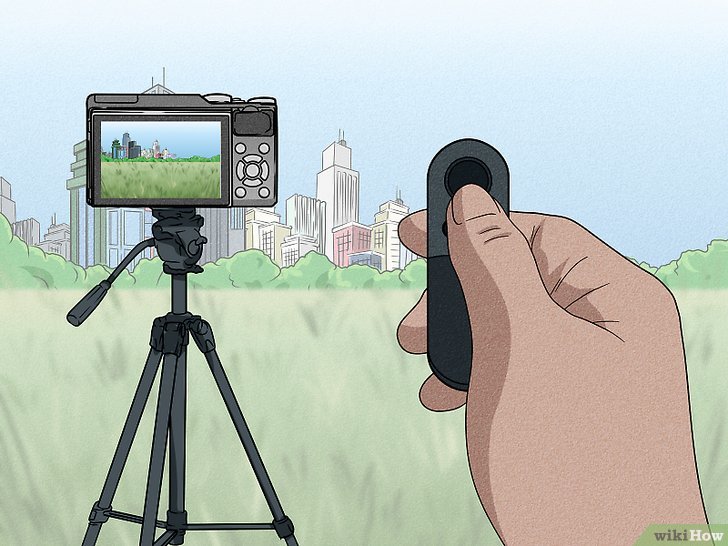
Choosing the appropriate tripod is a foundational step in achieving smooth, professional-quality video footage. The right tripod not only supports your camera effectively but also enhances stability, ease of use, and compatibility with various filming conditions. A well-selected tripod aligns with your specific recording needs, ensuring optimal performance and durability over time.
When selecting a tripod for video, it is essential to evaluate several key factors, including height adjustability, weight capacity, overall stability, and portability. These elements determine how well the tripod will serve your particular filming style, location, and equipment setup. Making an informed choice involves understanding how each feature impacts your videography workflow and the quality of your final product.
Factors to Consider When Choosing a Tripod
Effective tripod selection begins with assessing the following critical factors:
| Factor | Description |
|---|---|
| Height | Ensure the tripod can extend to your eye level, minimizing the need for bending or awkward postures. Adjustable height features allow for versatile shooting angles and comfortable operation in various environments. |
| Weight Capacity | Verify that the tripod can support your camera’s weight, including additional accessories like microphones, lights, or external monitors. Overloading a tripod can compromise stability and safety. |
| Stability | Look for tripods with sturdy legs, high-quality locking mechanisms, and materials that resist movement or wobbling. Stability is crucial for capturing sharp, shake-free footage, especially in outdoor or windy conditions. |
| Portability | Consider the weight and size of the tripod for ease of transport, setup, and storage. Lightweight models are ideal for on-the-go shooting, while heavier, more robust tripods suit stationary studio setups. |
| Ease of Use | Features such as quick-release plates, smooth pan and tilt controls, and intuitive locking mechanisms streamline the filming process and reduce setup time. |
Matching Tripod Features with Video Recording Needs
Aligning tripod specifications with your specific recording scenarios ensures optimal results. For instance, a documentary filmmaker shooting in diverse outdoor settings might prioritize lightweight, quick-setup tripods with adjustable height. Conversely, a studio videographer may opt for a heavier, more stable tripod with advanced leveling and fluid head features for smooth panning.
Here is a step-by-step guide to match your tripod features with your recording needs:
- Assess the typical weight of your camera and accessories to determine the minimum weight capacity required.
- Identify the maximum height you need for your shots, considering whether you often shoot from low or high angles.
- Evaluate the environments where you’ll shoot most frequently—outdoor, indoor, or studio—and choose a tripod that offers the appropriate stability and portability.
- Consider the type of filming—steady interviews, dynamic motion shots, or panoramic scenes—and select a tripod with suitable head types, such as fluid heads for smooth movement or ball heads for quick adjustments.
- Test the ease of setup and breakdown, especially if you need to move quickly between locations or shoot in remote areas.
Recommended Tripods for Different Videographers
Based on experience and market reviews, here are suggested models tailored for various skill levels:
- Beginner Videographers:
- Manfrotto Compact Action Tripod – lightweight, user-friendly, affordable, suitable for entry-level cameras and smartphones.
- AmazonBasics 60-Inch Lightweight Tripod – offers basic stability and height adjustment at an economical price point.
- Intermediate Videographers:
- Neewer Carbon Fiber Tripod – provides enhanced stability, lightweight design, and smooth pan/tilt mechanisms suitable for semi-professional setups.
- Benro Aero 4 Travel Angel Tripod – versatile with adjustable legs, ideal for travel and varied shooting conditions.
- Professional Videographers:
- Manfrotto MVH500AH Fluid Head Tripod – supports heavy cameras with fluid head for smooth motion shots, high stability, and durability.
- Sachtler Ace XL Tripod System – designed for high-end production, with precise controls, robust build, and excellent stability in challenging environments.
Camera Compatibility and Accessory Integration
Ensuring your tripod is compatible with a broad range of cameras and accessories is vital for flexibility and future-proofing your setup. Most tripods feature standard screw mounts (typically 1/4-inch or 3/8-inch), but it is important to confirm that the mounting plate supports your camera’s weight and size.
Additionally, check for compatibility with accessories such as quick-release plates, headphone monitors, external lights, or wireless control units. A tripod with a versatile mounting system and multiple attachment points can significantly enhance your shooting versatility. For professional use, consider tripods that support fluid heads with easy balancing features and precise controls, enabling seamless integration with DSLR, mirrorless, and even larger cinema cameras.
Compatibility ensures safety, stability, and efficiency, enabling you to focus on capturing high-quality footage without technical hindrances.
Setting Up a Tripod for Video Shooting
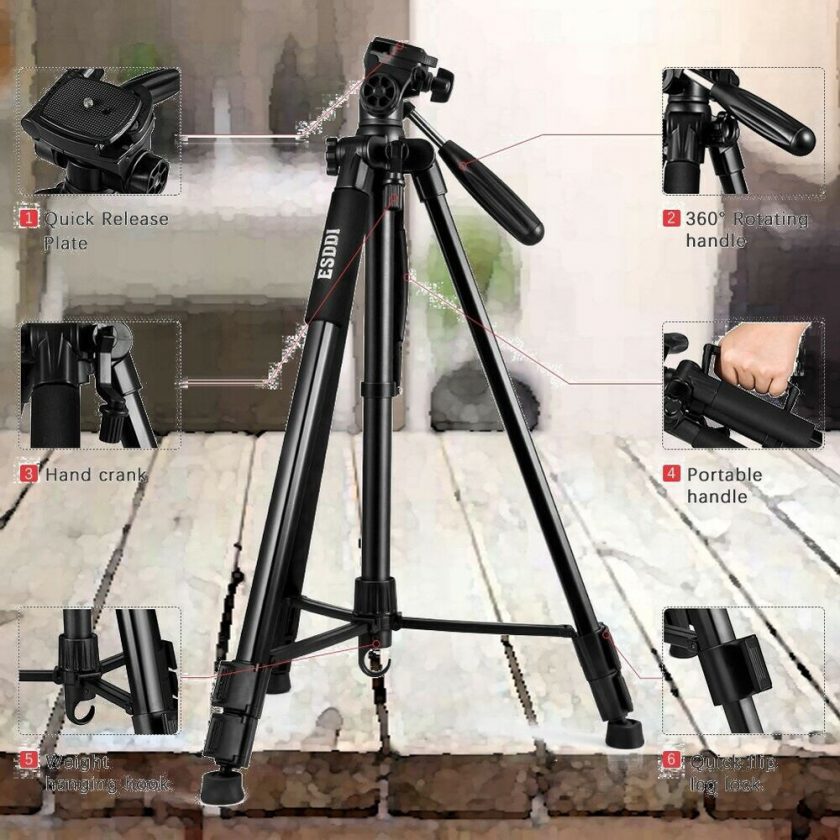
Properly setting up a tripod is fundamental to achieving stable and professional-looking video footage. A well-assembled and correctly adjusted tripod ensures that your camera remains steady, reduces unwanted vibrations, and allows for precise framing of your shot. The setup process involves unboxing, assembling, adjusting for height and stability, and securing your camera safely to the tripod head. Paying attention to each step maximizes the effectiveness of your equipment and contributes to high-quality video production.
Following a systematic approach when setting up your tripod prevents common issues such as instability, uneven camera angles, or accidental falls. This guide will walk you through the essential procedures to assemble your tripod correctly and prepare it effectively for video shooting.
Unboxing and Assembling the Tripod
Careful unboxing and assembly of your tripod set the foundation for a secure and stable setup. Begin by removing the tripod from its packaging, ensuring that all components—such as the legs, center column, and tripod head—are present and undamaged. Read the manufacturer’s instructions to familiarize yourself with the specific parts and assembly sequence.
Extend the tripod legs by unlocking the leg locks, starting from the bottom and working upwards if needed. Many tripods feature flip-locks or twist-locks; ensure they are fully engaged after extension to prevent collapse during use. Attach the center column if it is separate, aligning it with the mounting point at the tripod’s top. Some tripods have quick-release plates that facilitate rapid attachment of the camera; install the plate onto your camera’s tripod mount before securing it to the tripod head.
Adjusting Tripod Legs and Center Column for Optimal Height and Stability
Achieving the right height and stability involves careful adjustment of the tripod legs and the center column. Begin by leveling the tripod on an even surface, making sure all legs are firmly planted. Extend the legs to your desired height, locking them securely. For uneven terrain, extend the shorter leg or adjust individual leg angles if your tripod features adjustable leg angles, ensuring the tripod remains stable.
Adjust the center column if additional height is necessary but avoid raising it excessively, as this can compromise stability. In some cases, it is preferable to lower the center column and adjust the tripod height via the legs to maintain better balance. Always tighten all locks after adjustments to prevent movement during filming. For added stability on windy or uneven surfaces, consider spreading the tripod legs wider and increasing the angle between them.
Setup Steps, Tools Needed, Common Issues, and Troubleshooting Tips
| Setup Steps | Tools Needed | Common Issues | Troubleshooting Tips |
|---|---|---|---|
| Unbox all components and inspect for damage or missing parts. | None typically required, but a small Phillips screwdriver may be needed for some models. | Missing parts or damage during transport. | Contact manufacturer for missing parts or replace damaged components before proceeding. |
| Extend tripod legs evenly and lock securely. | None | Legs slipping or not locking properly. | Ensure locks are fully engaged; clean dirt or debris from locking mechanisms if needed. |
| Attach the center column if applicable and adjust for height. | None | Center column tilting or slipping. | Ensure the center column is securely fixed and tightened; avoid overextending the column. |
| Mount the quick-release plate and secure the camera. | Quick-release plate, screwdriver (if needed) | Camera slipping or unstable attachment. | Confirm the plate is properly attached to the camera and tightened using the screw; double-check the locking mechanism. |
Securing the Camera to the Tripod Head Safely
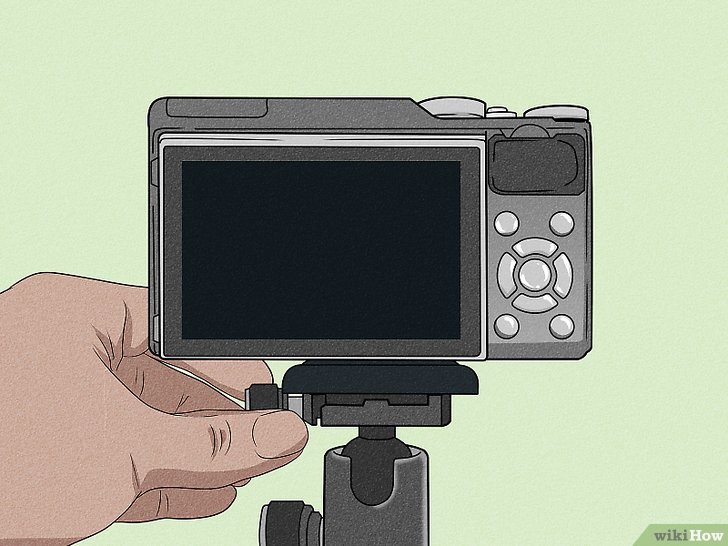
Safe attachment of the camera to the tripod head is critical to prevent accidental falls and damage. Begin by attaching the quick-release plate to the camera’s tripod mount, ensuring the screw is tightened securely but not overtightened to avoid damage. Once the plate is attached, slide or clip it onto the tripod head, depending on the model.
After mounting, double-check that the camera is firmly locked in place by engaging the safety lock or lever on the tripod head. Adjust the pan and tilt adjustments to position the camera at the desired angle, then tighten all locking knobs to secure the position. For added security, particularly in windy conditions or when using heavier cameras, consider using additional straps or safety clips if available.
Ensuring your camera is securely mounted minimizes risk and guarantees steady footage during filming.
Techniques for Using a Tripod to Improve Video Quality
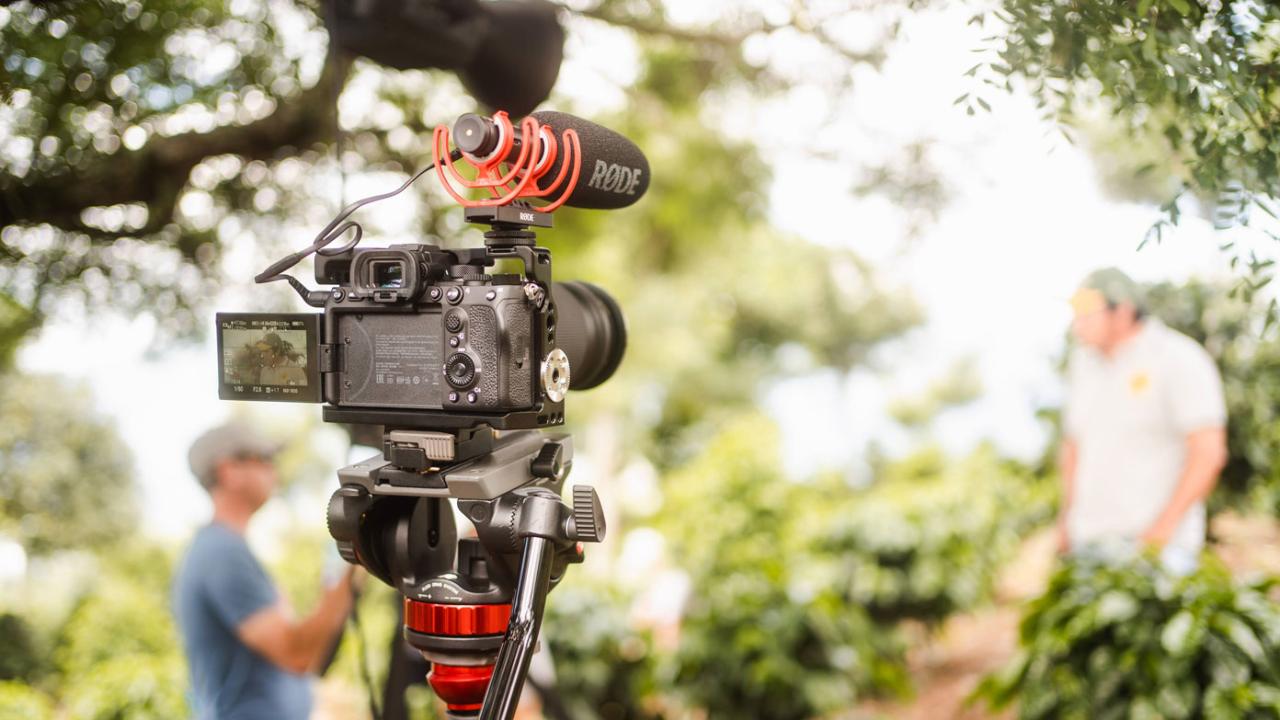
Using a tripod effectively is essential for achieving professional-looking videos. Proper techniques allow for smooth movement, precise framing, and stability, which collectively enhance the overall quality of your footage. Mastering these methods can dramatically reduce unwanted vibrations, jitters, and abrupt camera shifts, resulting in polished and visually appealing videos.A well-executed use of tripod controls, accessories, and proper balancing ensures your camera movement appears seamless and intentional.
Whether capturing a static shot or dynamic panning and tilting, understanding these core techniques will elevate your videography skills and produce more engaging content.
Techniques for Smooth Panning, Tilting, and Framing
Achieving fluid camera movements on a tripod relies heavily on controlled handling of the tripod’s pan, tilt, and framing mechanisms. This involves both understanding the functionality of the tripod’s controls and applying steady, deliberate motions to ensure professional-quality footage.To facilitate smooth movements:
- Use the tripod’s pan and tilt handles with gentle, controlled motions, avoiding sudden jerks.
- Maintain a consistent speed during panning and tilting to prevent jarring transitions.
- Employ slow, deliberate adjustments when framing your shot to maintain compositional integrity.
- Practice incremental movements between shots to achieve seamless transitions during editing.
The key is to move the camera smoothly, avoiding rapid or abrupt shifts, which can distract viewers and diminish the perceived quality. Utilizing tripod handles with a steady grip and practicing controlled movements helps to produce professional-looking results consistently.
Use of Tripod Accessories for Enhanced Control
Tripod accessories can significantly improve the control, stability, and versatility of your camera setup, enabling more professional results.Essential accessories include:
- Fluid Heads: These specialized tripod heads provide smooth, dampened panning and tilting motions, ideal for cinematic shots that require fluid movement. Fluid heads are equipped with adjustable damping for fine-tuning resistance, ensuring your camera moves smoothly during complex shots.
- Mounts and Adapter Plates: Secure your camera firmly to the tripod with quick-release plates, enabling fast setup and adjustments. These plates also facilitate precise repositioning and leveling of the camera.
- Quick-Release Plates: These allow for rapid attachment and detachment of the camera from the tripod, saving time between shots and reducing the risk of accidental drops.
- Joystick or Pan Handles: Additional control handles improve maneuverability, especially during complex movements like slow pans or tilts.
These accessories, when integrated properly, allow for greater control, stability, and efficiency, especially in professional or fast-paced filming environments.
Procedural Steps for Achieving Professional Shot Stability During Movement
Maintaining stability during camera movement is essential for producing high-quality, shake-free footage. The following procedural steps Artikel best practices:
- Ensure the tripod is placed on a flat, stable surface to prevent wobbling.
- Balance the camera on the tripod by adjusting the center column and counterweights if available, ensuring the weight is evenly distributed.
- Secure all tripod locks before beginning movement to prevent unintended shifts.
- Attach a fluid head or use stabilizers to facilitate smooth panning or tilting.
- Use both hands to control handles gently, maintaining a steady, controlled motion throughout the shot.
- Perform slow, deliberate movements, avoiding abrupt starts or stops.
- Monitor the shot continuously, making minor adjustments as needed to maintain framing and stability.
- After movement, lock the controls and carefully set the camera back to a still position to prevent vibrations.
Practicing these steps regularly enhances your ability to produce steady, professional-quality footage, even during complex camera movements.
Balancing the Camera to Avoid Vibrations and Shaky Footage
Proper balancing of your camera on the tripod is fundamental to reducing vibrations and ensuring stable footage. An unbalanced camera can introduce unwanted movements, especially during extended shots or slow pans.To achieve optimal balance:
Place the camera on the tripod and position it at the center of gravity, adjusting the tripod’s head and counterweights accordingly.
- Loosen the tripod head and position the camera so that it remains level without support from your hands.
- Adjust the counterweights to counteract the camera’s weight distribution, ensuring minimal resistance when moving the head.
- Tighten all adjustments securely, but do not overtighten, to allow smooth movement.
- Test the setup by gently panning or tilting; if the camera drifts or resists movement, readjust the counterweights and balance.
- Use vibration suppression accessories, such as rubber pads or isolation mounts, in environments prone to vibrations.
- During shooting, avoid applying additional force or pressure that could destabilize the camera setup.
- Regularly inspect the tripod and accessories for wear or loose parts that could compromise stability.
A well-balanced camera setup minimizes vibrations caused by movement or external factors, resulting in clean, professional footage free from shaky artifacts that can distract viewers and diminish overall quality.
Maintenance and Troubleshooting of Tripods
Ensuring your tripod remains in optimal condition is essential for consistent video quality and longevity of the equipment. Regular maintenance, along with understanding common issues and their solutions, can prevent costly repairs and prolong the lifespan of your tripod. Proper handling during transportation and storage, combined with safety precautions, further safeguards your investment and enhances your setup experience.Maintaining your tripod involves routine tasks that keep its mechanical parts functioning smoothly.
Additionally, recognizing common problems early and addressing them systematically can prevent further damage. Proper transportation and storage techniques help preserve the structural integrity of your tripod while safety measures ensure a secure setup process, minimizing accidents and damage.
Routine Maintenance Tasks
Maintaining your tripod involves simple yet crucial tasks that should be performed periodically to ensure smooth operation and durability. These tasks include:
- Cleaning joints and moving parts: Dust, dirt, and debris can accumulate within the joints, affecting their movement. Use a soft brush or compressed air to remove particles, and wipe down with a damp cloth if necessary. Avoid using harsh chemicals that could damage the material.
- Tightening screws and locks: Over time, screws and locking mechanisms may loosen due to regular use. Inspect all screws, knobs, and locks periodically, and tighten them with the appropriate tools to prevent wobbling or instability during shoots.
- Lubricating moving parts: Apply a small amount of lubricant designed for mechanical parts on the tripod’s joints, pivot points, or ball heads. This reduces friction and ensures smooth adjustments.
- Inspecting for damage: Regularly check for cracks, bent components, or corrosion, especially if the tripod is used in harsh environments or exposed to moisture.
Common Tripod Problems and Solutions
Understanding typical issues with tripods allows for quick and effective troubleshooting, preventing delays during shoots. Here are some common problems and recommended resolutions:
- Instability or wobbling: This often results from loose screws or uneven surface placement.
- Solution: Tighten all locking screws and ensure the tripod’s feet are firmly on a level surface. Use additional support or sandbags if needed for stability.
- Difficulty in adjusting the height or pan/tilt movements: May be caused by debris or lack of lubrication.
- Solution: Clean and lubricate the moving joints and locking mechanisms. Check for obstructions or debris around the adjustment knobs.
- Broken or stripped locking mechanisms: Occur from over-tightening or wear over time.
- Solution: Replace damaged parts through the manufacturer or authorized service centers. Avoid over-tightening locks to prevent stripping threads.
- Ball head slipping or not locking properly: Usually due to worn-out or improperly tightened lock knobs.
- Solution: Adjust or replace the lock knobs. Tighten the locking mechanism securely but avoid excessive force.
- Corrosion or rust: Common in humid environments, compromising metal parts.
- Solution: Clean affected areas with a rust remover or mild acid solution, then apply a protective lubricant or paint to prevent further corrosion.
Transporting and Storing Tripods
Proper handling during transportation and storage is vital for maintaining the structural integrity of your tripod. These practices can significantly extend the lifespan and ensure reliable performance:
- Use protective cases or padded bags: This shields the tripod from physical impacts, dust, and moisture during transit.
- Disassemble or collapse the tripod properly: Carefully fold or remove extendable parts to prevent bending or stress on joints.
- Store in a dry, cool environment: Avoid exposure to direct sunlight, extreme temperatures, or moist areas that can cause material degradation or corrosion.
- Keep away from sharp objects: Store your tripod in a dedicated space where it’s unlikely to be scratched or damaged by other gear.
Safety Tips for Setup and Use
Implementing safety measures minimizes risks of accidents or damage when handling tripods. Adopting these safety tips enhances both personal safety and equipment longevity:
- Ensure stable footing: Always set the tripod on an even surface, and use adjustable feet or spikes to accommodate uneven terrains.
- Secure all locks and fasteners: Before mounting equipment, verify that all locking mechanisms are firmly engaged to prevent sudden collapses.
- Distribute weight evenly: When mounting cameras or accessories, balance the load to avoid tipping or undue stress on joints.
- Be mindful of surroundings: Keep cables, accessories, and bystanders clear of moving parts and trip hazards during adjustment or setup.
- Handle with care: Avoid forcing or over-tightening locks and joints, which can lead to damage or failure.
Conclusion
In conclusion, mastering how to use a tripod for video is a valuable investment in your filmmaking journey. With the right equipment, proper setup, and technique, you can achieve stable, professional-quality footage that enhances your storytelling. Keep practicing and maintaining your tripod to ensure consistent performance and excellent results in every shoot.