mastering how to use chroma key technology opens up a world of creative possibilities in video production, allowing creators to effortlessly replace backgrounds and craft immersive visual scenes. This technique has become a staple in filmmaking, streaming, and digital content creation, offering professional results with proper setup and software skills. Understanding the foundational principles and best practices ensures a smooth workflow from setup to final editing, making your projects stand out with polished and captivating visuals.
This guide provides comprehensive insights into the process of using chroma key, from preparing your shooting environment and equipment to refining and applying digital effects. Whether you’re a beginner or looking to enhance your techniques, you’ll find practical steps and expert tips to achieve clean, realistic keying results for your creative needs.
Introduction to Chroma Key Technology
Chroma key technology, commonly known as green screen or blue screen, is a foundational technique in modern video production that enables filmmakers and content creators to seamlessly replace a solid-colored background with digital images or scenes. This method allows for creative flexibility, enabling the integration of subjects into diverse virtual environments without the need for physical set changes.
Originally developed for weather forecasts and news broadcasting in the mid-20th century, chroma key has evolved significantly with advancements in digital imaging and computer processing. From its initial use in simple studio setups to its current application in high-definition film productions, virtual reality, and live streaming, this technique has become indispensable in multimedia creation.
Overview of Equipment Used in Chroma Key Setups
Implementing an effective chroma key setup requires specific equipment to ensure professional-quality results. The selection of proper tools and materials directly influences the clarity and precision of the background replacement process. Below are the essential components used in a typical chroma key system:
| Equipment | Description |
|---|---|
| Chroma Key Screen | A solid-colored backdrop, usually green or blue, made from fabric, paper, or paint, used as the background surface. The color choice depends on the subject’s wardrobe and scene requirements. |
| Lighting | Consistent and even lighting is crucial. Soft, diffuse lights are preferred to minimize shadows and color spill, ensuring a uniform background color. |
| Camera | A high-resolution camera capable of capturing detailed images, essential for clarity during the keying process. DSLR or professional video cameras are common choices. |
| Green/Blue Screen Material | Specialized fabric or painted surfaces designed to provide a smooth and uniform background, reducing reflections and wrinkles that could hinder chroma keying. |
| Chroma Key Software | Digital tools that facilitate the removal of the background by detecting the specific color range and replacing it with desired visuals. Examples include Adobe After Effects, OBS Studio, and Final Cut Pro. |
“Proper lighting and background uniformity are essential to achieving a clean key and avoiding artifacts in the final composite.”
By integrating these components with careful setup and calibration, producers can create professional-quality chroma key effects suitable for a broad range of creative projects, from film and television to virtual events and online content creation.
Preparing for a Chroma Key Shoot
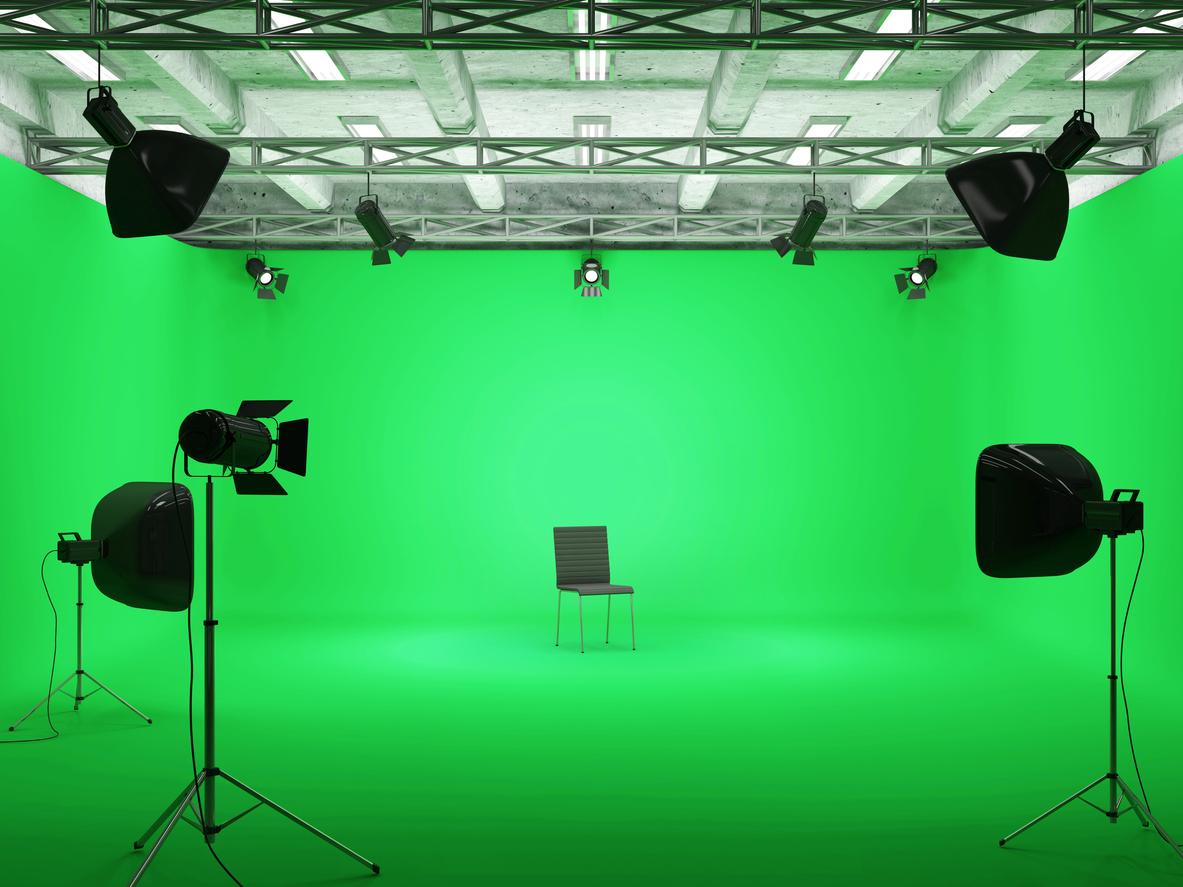
Effective chroma keying begins well before the camera starts rolling. Proper preparation ensures that the background and lighting conditions facilitate seamless background removal and compositing. Taking the time to set up the right environment, organize equipment, and prepare your subject will significantly improve the quality of your final footage.
This phase involves selecting an appropriate backdrop, arranging lighting to eliminate shadows and achieve uniform illumination, and ensuring all necessary equipment and space are ready for the shoot. Meticulous planning during this stage helps avoid common issues such as color spill, uneven lighting, or shadows that can complicate post-production editing.
Setting Up a Green or Blue Screen Backdrop
Choosing a suitable backdrop color and setting it up correctly are crucial steps in chroma key production. The backdrop should be a solid, evenly colored surface that contrasts distinctly with the subject’s clothing and props. Green and blue are the most common colors, chosen based on the subject’s attire and the background environment.
Key considerations for setup include ensuring the backdrop is large enough to fully accommodate the subject with ample margin, stretching it tight to avoid wrinkles or creases that can cause shadows or uneven color patches. The backdrop should be securely fastened to prevent movement during filming, which could lead to inconsistencies in the keyed footage. Additionally, the surface should be smooth and non-reflective; matte finishes are preferred to minimize light reflections that could interfere with chroma keying.
Proper backdrop setup involves maintaining a clear separation between the subject and the background to prevent color spill. This can be achieved by positioning the subject at least a few feet in front of the backdrop, depending on the camera’s focal length and lens characteristics, to reduce color contamination on the subject’s edges.
Organizing Lighting Arrangements
Consistent, even lighting is essential for successful chroma keying. The primary goal is to illuminate the backdrop uniformly while avoiding shadows, hotspots, or reflections. Proper lighting arrangements enhance the flatness of the background color, making it easier to remove during post-processing.
Typically, a three-point lighting setup is employed, consisting of key, fill, and back lights. The key light provides the main illumination on the subject, the fill light softens shadows created by the key light, and the backlight separates the subject from the background, preventing color spill. When lighting the green or blue screen, separate lights are directed at the backdrop to achieve uniform brightness, commonly aiming for a consistent luminance level, such as 50-60 lux, depending on the environment.
To eliminate shadows and hotspots, lights should be diffused using softboxes or umbrella reflectors. Light positioning should be symmetrical for the backdrop, ensuring even color density. It is recommended to use light meters to measure luminance levels and verify uniformity across the entire screen. Proper distance between lights and backdrop helps reduce hot spots and shadows, while adjustable stands provide flexibility for fine-tuning angles and height.
Equipment, Space, and Subject Preparation Checklist
Thorough organization prior to shooting minimizes disruptions and technical issues. The following checklist ensures all necessary elements are in place for a smooth chroma key production:
| Category | Items to Check |
|---|---|
| Equipment |
|
| Space |
|
| Subject Preparation |
|
Note: Ensuring all equipment is tested and functioning properly before the shoot can prevent delays. Conducting a quick run-through helps identify potential issues with lighting, backdrop positioning, or camera settings.
Filming with a Chroma Key Background

Capturing high-quality footage with a chroma key setup requires precise planning and execution. Properly positioning subjects and cameras enhances the effectiveness of the keying process, resulting in seamless integration of the foreground with the background. Additionally, optimized camera settings and techniques to prevent color spill or reflections are essential to achieving professional results. This section provides detailed guidance to help videographers and content creators master the art of filming with a chroma key backdrop.
Ensuring optimal filming conditions involves understanding the spatial relationship between subjects, the background, and the camera. Proper configuration minimizes shadows, reflections, and color spill, which are common challenges in chroma key production. By adhering to best practices, creators can produce footage that requires minimal post-production correction, saving time and resources while maintaining a high standard of visual quality.
Positioning Subjects and Cameras for Optimal Keying Results
Effective chroma key filming begins with strategic positioning of both the subject and the camera. The goal is to maximize separation between the subject and the background, reducing the likelihood of color spill and shadow issues that complicate keying. Proper placement also ensures even lighting and a clear line of sight for the camera, which enhances focus and image clarity.
Key considerations for positioning include:
- Maintain a sufficient distance between the subject and the green screen, typically at least 3 to 5 feet. This distance helps prevent color spill and reflections from the background onto the subject.
- Arrange the subject so that they are centered and evenly lit, which simplifies the post-production keying process.
- Position the camera at a reasonable distance to capture the subject with adequate detail, avoiding wide-angle shots that can distort proportions or focus issues.
- Use a tripod or stable support to prevent camera shake, maintaining consistent framing and focus throughout the shoot.
Optimizing Camera Settings for Color Accuracy and Focus
Correct camera settings are fundamental to capturing footage with true color representation and sharp focus. These settings influence the quality of the chroma key process, as inaccuracies can lead to difficult keying and unwanted artifacts.
Key settings to adjust include:
- White Balance: Set the white balance manually to ensure colors are true to life, which is crucial for consistent color separation during keying.
- ISO Settings: Use the lowest ISO possible to reduce image noise. High ISO can introduce grain, complicating the keying process.
- Aperture: Use a narrow aperture for a greater depth of field, keeping the entire subject in sharp focus. This reduces the risk of parts of the subject being out of focus, which can interfere with keying.
- Shutter Speed: Set the shutter speed to double the frame rate (e.g., 1/50s for 25fps) to maintain natural motion and avoid motion blur that can affect keying accuracy.
Additionally, shooting in a higher bit-depth format (such as 10-bit or higher) preserves color information, providing more flexibility during post-production editing and keying.
Preventing Color Spill and Reflections on the Subject
Color spill and reflections are common issues that can compromise chroma key quality. These phenomena occur when the green or blue light from the background reflects onto the subject, blending unwanted color hues into the foreground footage.
Methods to prevent these issues include:
- Maintaining adequate distance between the subject and the background to minimize light reflection and spill. The recommended distance is at least 3 to 5 feet.
- Using controlled, directional lighting to evenly illuminate the background and subject independently. This reduces the chances of light bouncing back onto the subject.
- Applying flags or cutters to block stray light and prevent it from illuminating the subject or reflecting onto the background.
- Employing high-quality, matte finishes on the subject’s clothing and props to reduce shine and reflections that can pick up the green or blue hues.
- Utilizing post-production techniques, such as matte cleanup or spill suppression tools, to further mitigate residual color spill or reflections.
Proper lighting and consistent distance are key to preventing color spill, ensuring cleaner keying results and a more professional appearance.
Software Tools for Chroma Keying
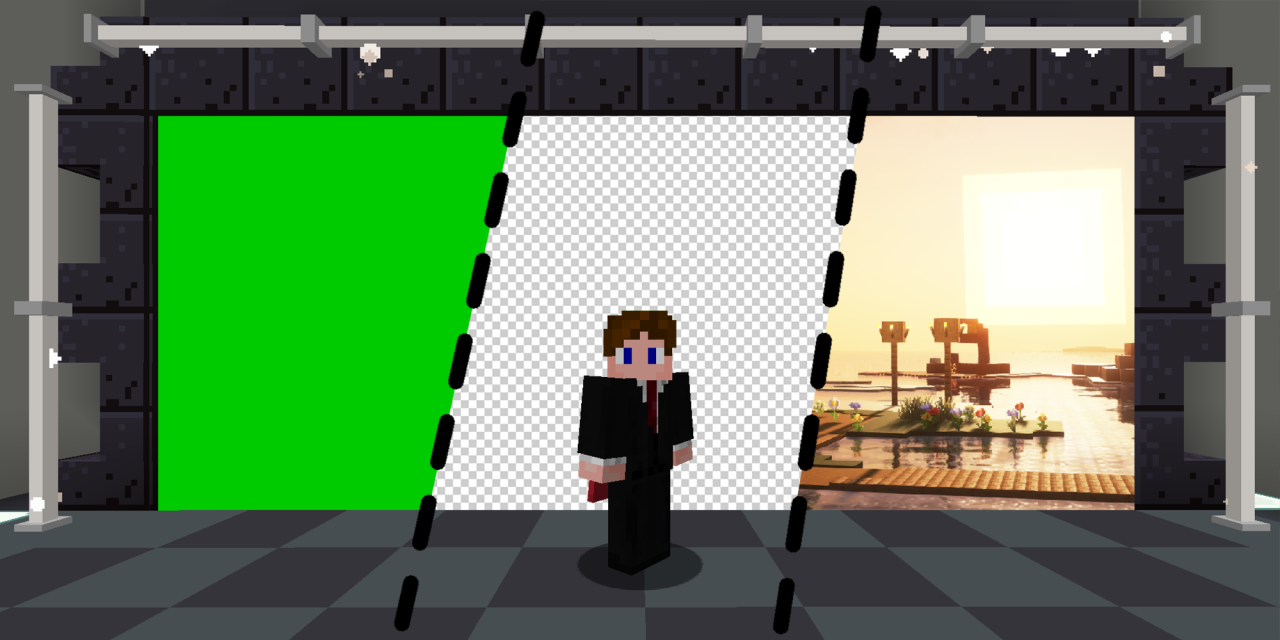
Choosing the right software is crucial for achieving professional-quality chroma key effects. Several popular options are available, each offering unique features, user interfaces, and levels of complexity. This section provides an overview of some of the leading chroma keying applications, their capabilities, and ease of use to help you select the most suitable tool for your project.
Whether you are a beginner seeking straightforward functionality or a professional requiring advanced controls, understanding the strengths of each software will facilitate a smoother workflow. The process of importing footage and applying chroma key effects varies across platforms, but core steps remain consistent. Additionally, fine-tuning keying parameters such as tolerance, edge softness, and spill suppression is essential for achieving a seamless composite.
The following comparison and instructions aim to guide you through these essential tasks efficiently.
Popular Chroma Keying Software Options
Several software solutions dominate the market due to their features, user-friendly interfaces, and compatibility with various operating systems. Here, we compare some of the most widely used options:
| Software | Features | User Interface | Platform | Pricing |
|---|---|---|---|---|
| Adobe Premiere Pro | Advanced chroma keying, real-time editing, integration with Adobe Creative Cloud | Intuitive timeline-based interface, customizable workspace | Windows, macOS | Subscription-based, monthly or annual plans |
| Final Cut Pro X | High-quality keying, multi-cam editing, professional color grading | Drag-and-drop with streamlined controls, magnetic timeline | macOS only | One-time purchase |
| DaVinci Resolve | Powerful chroma key tools, color correction, free version available | Layered workspace with dedicated color and editing panels | Windows, macOS, Linux | Free basic version, Studio version paid |
| HitFilm Express | Special effects, keying, composite shot enhancements | Modular interface, beginner-friendly with advanced options | Windows, macOS | Free with optional paid upgrades |
| OBS Studio | Live streaming, real-time chroma keying, customizable settings | Simple interface optimized for live production | Windows, macOS, Linux | Open-source and free |
Steps to Import Footage and Apply Chroma Key Effects
Effectively applying chroma key effects involves a sequence of precise steps regardless of the software used. Below is a generalized workflow applicable across most platforms:
- Import your footage: Begin by loading your background plate and foreground footage into the software’s media library or project panel.
- Add footage to the timeline or composite panel: Drag and position your clips accordingly for editing or compositing.
- Apply the chroma key effect: Locate the chroma key or green screen effect within the effects or filters menu, then drag it onto your foreground clip.
- Adjust keying parameters: Use the software controls to refine the chroma key, focusing on removing the green or blue screen and blending the subject with the background seamlessly.
- Preview and refine: Play back your composition repeatedly, tweaking parameters until the key looks clean and natural.
Each software will have specific controls and terminology, but the core process remains similar. Familiarity with these steps ensures a smoother workflow and higher quality output.
Adjusting Keying Parameters
Fine-tuning your chroma key involves manipulating several key settings to improve the quality of the composite. The table below organizes common parameters and their typical adjustment methods across various software platforms:
| Parameter | Description | Typical Adjustment Method |
|---|---|---|
| Tolerance | Determines the range of color hues considered as part of the key color, affecting how much of the background is removed. | Adjust slider or numeric input; increasing tolerance captures more shades of green/blue. |
| Edge Softness | Controls the feathering or blurring of the edges around the keyed subject for a more natural blend. | Use softness or feather sliders; higher values create smoother edges. |
| Spill Suppression | Reduces color spill or unwanted background color reflected onto the subject, often green or blue tint. | Enable spill suppression tools and adjust intensity sliders to neutralize color cast. |
| Contrast | Adjusts the contrast of the key for better separation between the subject and background. | Modify via contrast sliders; higher contrast can improve edge definition. |
| Gain | Increases the overall strength of the keying effect, helping to eliminate residual background. | Adjust gain controls; careful tuning prevents over- or under-processing. |
“Precise adjustment of keying parameters is essential to achieving a professional-looking composite, especially when dealing with uneven lighting or shadows on the green screen.”
Editing and Refining the Chroma Key Effect
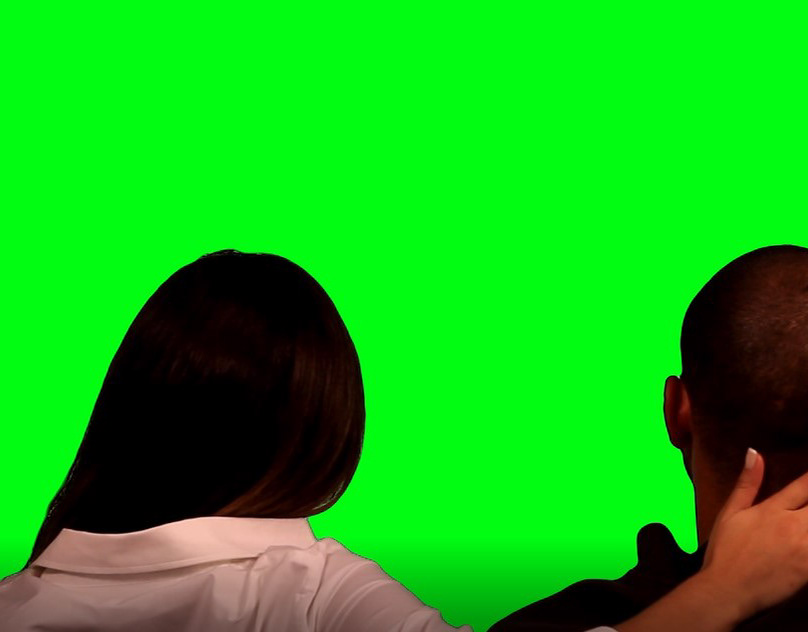
Achieving a seamless chroma key composite requires meticulous editing and refinement. Even after initial keying, residual green or blue hues can persist, and edges may appear unnatural or fringed. Properly refining these aspects ensures a professional and visually appealing final output. This section explores techniques to optimize the key, improve edge quality, and effectively layer background content.Editing the chroma key involves fine-tuning the keying parameters to eliminate residual color casts and enhance overall transparency.
Post-processing adjustments are integral to professional-grade composites, especially when dealing with uneven lighting or imperfect backgrounds.
Techniques for Fine-Tuning the Key to Remove Residual Cast
Residual color spill, often seen as a green or blue hue around the subject, can distract from the realism of the composite. To address this, editors can utilize specific color correction tools to neutralize residual hues.
- Apply color spill suppression: Many editing software programs include spill suppression tools that target the specific hue (green or blue) and reduce its intensity without affecting the subject’s natural tones.
- Use hue and saturation adjustments: Carefully desaturate or shift the hue of the residual cast areas, focusing only on the fringe zones to prevent altering the subject’s appearance.
- Implement color key refinement: Adjust the similarity and blend thresholds to tighten the key and eliminate faint traces of green or blue that may have escaped initial removal.
“Targeted color correction, when combined with spill suppression, can significantly reduce unwanted color casts, resulting in a cleaner composite.” — Video Editing Best Practices
Approaches to Improving Edge Quality and Preventing Fringing
Unnatural edges and fringing artifacts are common challenges in chroma key compositing. These issues arise from color spill, soft focus, or compression artifacts. The following approaches enhance edge clarity and prevent fringing:
- Use edge feathering or matte refinement: Many editing tools allow for softening or sharpening edges selectively. Applying a subtle feathering can create smoother transitions, while sharpening can enhance edge definition where needed.
- Employ matte choker or matte cleanup tools: These functions tighten the matte boundary, reducing fringe artifacts by trimming unwanted semi-transparent pixels around the subject’s edges.
- Implement mask refinement: Manually refining masks or using edge-detection algorithms ensures precise separation, especially around complex areas like hair or loose clothing.
“Refined edge control is essential for realistic composites; small improvements can dramatically elevate visual quality.” — Visual Effects Technique Manual
Layering Background Images or Videos Effectively
Effective layering involves not just placing a background behind the keyed subject but also ensuring proper alignment, scale, and integration to preserve realism.
| Method | Description |
|---|---|
| HTML Tables for Layering | Using HTML tables, backgrounds can be set as separate cells behind the video or image cells containing the subject. For example, placing the chroma keyed subject in one cell with a background image or video in an adjacent cell creates a layered effect. Adjust cell sizes and background properties to achieve the desired composition. |
| Blockquote for Descriptive Layering | Employing blockquotes can help clearly articulate background layering strategies, such as layering multiple backgrounds, adjusting opacity, or applying overlays for effects like fog or light flares. These approaches add depth and realism to the scene. |
By carefully layering backgrounds—whether through HTML structures or visual effects—creators can produce compelling and immersive scenes. Proper integration requires attention to perspective, scale, and lighting consistency to ensure the composite appears natural and convincing.
Creating Visual Effects with Chroma Key
Chroma key technology opens up a vast realm of creative possibilities for visual storytelling, allowing filmmakers and content creators to seamlessly integrate animated backgrounds and elaborate special effects into their scenes. Mastering these techniques enables the production of immersive environments and dynamic sequences that captivate audiences and elevate the overall production quality.
Effective integration of animated backgrounds and special effects requires careful planning, precise execution, and a solid understanding of compositing techniques. Combining multiple layers and matching visual elements convincingly can transform simple recordings into complex, visually stunning scenes that convey fantasy worlds, futuristic landscapes, or dramatic impacts with realism and flair.
Integrating Animated Backgrounds and Special Effects
Incorporating animated backgrounds and special effects involves selecting appropriate assets and ensuring they blend seamlessly with the foreground subject. This process often uses dedicated visual effects software to animate backgrounds—such as moving skies, bustling cityscapes, or abstract digital environments—and overlay them behind the subject with proper masking and keying techniques. The key to success lies in maintaining consistent lighting and perspective so that animations appear naturally within the scene.
Key considerations include matching the animation’s lighting, shadows, and motion to the foreground subject to avoid visual dissonance, which can break the illusion of realism.
Special effects like particle systems, explosions, and lens flares can be added to enhance scenes. These effects are often created using compositing software, which allows layering and precise timing to synchronize effects with the action. For instance, adding a glowing spell in a fantasy scene or a simulated explosion requires meticulous timing and integration to ensure they appear authentic and impactful.
Compositing Multiple Layers for Complex Scenes
Creating complex scenes with multiple layers demands a systematic approach to compositing. This involves combining several visual elements—backgrounds, foreground action, animated effects, and overlays—into a cohesive image. Proper layering ensures that each component interacts logically within the scene, maintaining depth and spatial relationships.
To achieve this, artists often work with alpha channels and masks to isolate elements, allowing precise control over what appears in front or behind other visuals. This technique is especially crucial when integrating multiple animated elements or effects, as it helps prevent visual clutter and preserves clarity. Consistent use of color grading and lighting adjustments across layers is essential to achieve harmony and realism.
| Layering Tips |
|---|
| Maintain consistent lighting and shadows across all layers to establish a unified look. |
| Use masks and alpha channels to isolate and manipulate individual elements effectively. |
| Apply color correction to match the tone and mood of different layers for seamless integration. |
Matching Lighting and Perspective for Realism
One of the most critical aspects of creating convincing chroma key scenes is ensuring that lighting and perspective are accurately matched between the foreground subject and background or effects. Discrepancies in light direction, intensity, or color can immediately diminish the believability of the scene, no matter how sophisticated the compositing.
Lighting considerations include matching the directionality, shadows, and color temperature of the background to the foreground subject. For example, if the background depicts a sunset scene with warm, orange light, the subject must be lit similarly to avoid a jarring contrast. Perspective alignment involves positioning the subject and background elements so that they appear to occupy the same spatial plane, creating depth and spatial coherence.
Using visual cues such as vanishing points and horizon lines helps achieve correct perspective, while color grading and lighting adjustments refine the overall realism.
Practical techniques involve analyzing scene lighting conditions, employing light meters, and adjusting studio lighting accordingly. In post-production, color correction tools can fine-tune the hue, saturation, and brightness to ensure all elements blend naturally, producing a cohesive and convincing scene that draws viewers into the visual narrative.
Troubleshooting Common Chroma Key Issues

Even with proper setup and equipment, chroma keying can present challenges that affect the quality of the final composite. Addressing these issues requires a systematic approach to identify the root causes and implement effective solutions. Understanding common problems such as uneven lighting, color spill, and jagged edges enables creators to produce cleaner, more professional-looking chroma key effects.
Below are typical issues encountered during chroma key production along with organized solutions and a step-by-step guide to problem-solving. This structured approach ensures efficient troubleshooting and enhances the overall quality of your chroma key projects.
Uneven Lighting on the Green Screen
Uneven lighting results in inconsistent chroma keying, creating shadows and bright spots that complicate the removal process. Proper lighting is crucial for achieving a smooth, uniform background.
- Ensure that the green screen is evenly lit using multiple soft light sources placed at equal distances, minimizing hot spots and shadows.
- Use diffusers or softboxes to spread light evenly across the background, avoiding harsh shadows or bright patches.
- Maintain consistent distance between the light sources and the green screen to prevent variations in illumination.
- Adjust camera settings to optimize exposure and prevent overexposure of the background, which can exacerbate unevenness.
Color Spill or Green Cast on Subject
Color spill occurs when green light reflects onto the subject, causing a green Artikel that diminishes realism. Managing spill is critical for seamless integration.
- Increase the distance between the subject and the green screen to reduce reflected green light.
- Use flags or barn doors to block light from bouncing onto the subject, directing it solely onto the background.
- Adjust the lighting angles to prevent direct illumination of the subject’s edges by the green light.
- Utilize chroma key software features such as spill suppression or edge refinement tools to mitigate residual green reflections.
Jagged or Rough Edges Around the Subject
Jagged edges often result from insufficient keying settings, low-resolution footage, or poor lighting. Achieving smooth edges enhances realism and visual appeal.
- Increase the keying softness or feathering settings in your chroma key software to smooth out rough edges.
- Use higher resolution footage to preserve edge details and prevent pixelation that can cause jaggedness.
- Refine the matte by adjusting contrast and edge parameters to better differentiate the subject from the background.
- Apply edge cleanup tools, such as matte choker or edge feathering, to smooth transitions and eliminate artifacts.
Problem-Solving Flowchart
The following table provides a structured, step-by-step approach to troubleshooting common chroma key problems:
| Problem | Possible Cause | Solution |
|---|---|---|
| Uneven background lighting | Insufficient or inconsistent lighting setup | Adjust lighting placement, use diffusers, ensure even coverage |
| Green spill on subject | Close proximity, reflected green light, poor lighting angles | Increase distance, block reflections, reposition lights |
| Jagged edges around subject | Low resolution, improper keying settings, harsh edges | Use higher resolution footage, refine keying parameters, apply edge smoothing |
| Background not fully removed | Shadow, color variation, insufficient contrast | Improve background lighting, adjust keying settings, use contrast controls |
Note: Consistent lighting, proper camera settings, and software refinement are essential for achieving high-quality chroma key results. Regularly preview footage during shoots to catch issues early and make necessary adjustments.
Tips for Professional Chroma Key Production
Creating a seamless and convincing chroma key effect requires meticulous attention to detail during all phases of production. From consistent backgrounds to high-quality post-processing, these expert tips can elevate the professionalism and realism of your chroma key projects. Implementing these strategies ensures your final output appears polished, credible, and visually engaging, whether for film, broadcast, or online content.Achieving professional results involves controlling every aspect of the shoot and post-production process.
Proper planning, attention to detail during filming, and refined editing techniques significantly impact the quality of the final composite. Consistency and precision are essential for creating a believable scene that captures viewers’ attention without distraction.
Maintaining Consistent Backgrounds and Lighting
Consistency in background appearance and lighting conditions is fundamental to successful chroma key production. Variations in these elements can cause unwanted shadows, color spills, and difficulty in keying out the background cleanly. To achieve uniformity:
- Use high-quality, evenly lit green or blue screens with no wrinkles or shadows. Flat, taut surfaces help maintain consistent color and prevent uneven keying.
- Employ multiple light sources with softboxes or diffusers to ensure even illumination across the background, reducing hotspots and shadows.
- Match the lighting setup on the subject with the background environment to ensure natural integration. This can involve adjusting light color temperature and intensity to match the scene’s ambiance.
- Use a consistent camera setup, including fixed aperture, ISO, and shutter speed, to prevent exposure fluctuations that might affect keying quality.
Enhancing Final Output Quality Through Post-Processing
Post-processing is where the magic of chroma key compositing truly comes alive. Refining the key, color grading, and adding visual effects can dramatically improve the realism and aesthetic appeal of the final product.
Key steps to optimize your post-production workflow include:
- Applying advanced chroma keying techniques using professional software tools that offer fine-tuning controls for edge softness, spill suppression, and matte refinement.
- Utilizing color correction to match the foreground with the background’s lighting and color palette. This can involve adjusting shadows, highlights, and midtones to create a cohesive scene.
- Implementing edge refinement tools such as matte choker, de-spill modules, and feathering to eliminate residual color spill and create smooth transitions around the subject.
- Adding subtle visual effects, such as motion blur or lens effects, to integrate the composite more naturally into the environment.
“Attention to detail in post-processing ensures the chroma key effect is seamless, reducing distractions and enhancing viewer immersion.”
Successful Chroma Key Project Examples
Examining real-world examples of high-quality chroma key projects offers valuable insights into best practices and creative possibilities.
One notable example is a weather broadcast studio that used a well-lit, uniform green screen combined with advanced keying software. The meteorologist’s movements were captured with minimal spill and clean edges, allowing animated weather maps to be dynamically integrated behind them. Post-processing involved subtle color grading to match the studio lighting, resulting in a professional and engaging broadcast that maintained a high level of visual clarity.
Another case involves a viral online video featuring a gaming streamer who employed a high-quality blue screen with consistent lighting. The streamer used real-time chroma keying combined with background replacement software, adding animated effects and dynamic backgrounds synchronized with gameplay. The careful setup and post-production refinements produced a polished, immersive experience that resonated with viewers and garnered widespread acclaim.
In both cases, meticulous planning, controlled filming environments, and skilled post-processing contributed to the success. These projects exemplify how blending technical expertise with creative vision results in compelling visual storytelling through chroma key technology.
Last Recap
In conclusion, mastering how to use chroma key empowers you to produce visually stunning content that captivates your audience. By understanding setup procedures, software adjustments, and troubleshooting techniques, you can elevate the quality of your videos and explore limitless creative avenues. With consistent practice and attention to detail, your chroma key projects will reach a professional standard and leave a lasting impression.