Understanding how to normalize audio is essential for achieving professional and consistent sound levels across various recordings and platforms. Normalization ensures that audio tracks are balanced in volume, enhancing the listener’s experience without distortion or imbalance. Whether you’re working on a podcast, music production, or preparing audio for streaming, mastering normalization techniques is vital for producing clear and uniform sound quality.
Introduction to audio normalization
Audio normalization is a fundamental process in audio production and editing that adjusts the volume levels of a recording to achieve a consistent and balanced sound. Its primary purpose is to ensure that the audio material maintains an optimal loudness level, enhancing clarity and listener comfort across various playback environments. Whether preparing a podcast, music track, or speech recording, normalization helps create a uniform listening experience that prevents abrupt volume changes.
Implementing normalization affects both the technical quality and the perceptual quality of audio. Proper normalization reduces the need for listeners to constantly adjust the volume, which can lead to fatigue or discomfort. It also ensures that the audio meets industry standards for loudness, especially important when distributing content across multiple platforms or media. For example, broadcasting stations often normalize audio to meet specific loudness levels, ensuring that a listener’s volume control remains consistent when switching between channels or programs.
Purpose and Benefits of Audio Normalization
Normalization plays a crucial role in improving the overall quality of audio recordings by aligning their loudness levels. This process is especially beneficial in scenarios where audio content originates from multiple sources with varying volume levels, such as interviews recorded in different environments, or music tracks from different producers. When audio is normalized, these inconsistencies are minimized, resulting in a seamless listening experience.
Another significant benefit of normalization involves compliance with industry standards. For instance, broadcast audio often needs to meet specific loudness criteria set by organizations like the International Telecommunication Union (ITU) or media platforms such as YouTube. Meeting these standards ensures that content is delivered professionally and prevents user complaints associated with overly loud or quiet audio segments.
Typical Scenarios Requiring Normalization
Normalization is particularly useful in a variety of real-world situations where uniformity in audio loudness is essential for quality and compliance. It becomes necessary when preparing audio for different purposes, such as:
- Podcast productions, where multiple speakers may have varying vocal volumes, requiring adjustment for a balanced sound.
- Audio books or voice recordings intended for public release, to ensure consistent speech levels that are comfortable for listeners over extended periods.
- Music albums, especially compilations with tracks recorded at different times and settings, to maintain a cohesive listening experience.
- Broadcast media, where loudness standards must be met to prevent viewer or listener discomfort and to comply with regulatory requirements.
- Online content creation, such as YouTube videos or streaming, where normalization helps to prevent sudden volume jumps that could distract or annoy viewers.
In all these cases, normalization enhances the clarity, professionalism, and overall quality of the audio, fostering a more engaging and pleasant experience for the audience.
Types of normalization methods
Audio normalization encompasses various techniques designed to ensure consistent loudness levels across different audio files or segments. Selecting the appropriate normalization method depends on the specific application, whether it’s for music production, broadcasting, or streaming. Understanding the distinct approaches allows audio engineers and content creators to optimize sound quality and listener experience effectively.Normalization methods primarily fall into two categories: peak normalization and RMS normalization.
Additionally, loudness normalization has gained prominence, especially for streaming platforms, where perceptual loudness consistency is essential. Each method has unique advantages and ideal use cases, which are detailed below.
Peak normalization
Peak normalization adjusts the amplitude of an audio track so that its highest peak reaches a specific target level, typically just below the maximum allowable digital value to avoid clipping. This method ensures that the loudest point of the audio does not exceed a predefined threshold, thereby standardizing volume peaks across multiple audio files.In practice, peak normalization involves measuring the maximum sample value within the audio file and then applying a linear gain adjustment to align this peak with the target level.
For example, if the highest peak is at -3 dBFS (decibels relative to full scale) and the target peak is set at -1 dBFS, the entire audio will be amplified by 2 dB. This method is straightforward and quick, making it suitable for applications where preventing distortion is critical, such as broadcasting or mastering.
RMS normalization
Root Mean Square (RMS) normalization focuses on achieving a consistent perceived loudness by adjusting the audio based on its average energy content. RMS measurement considers the energy of the audio signal over time, providing a more accurate representation of how loud the audio sounds to human ears, compared to peak levels.This method involves calculating the RMS value of the audio signal and then applying gain to match a predefined target RMS level.
For example, in music production, RMS normalization ensures a uniform loudness level across different tracks, enabling smoother playlists and reducing listener fatigue. RMS normalization is particularly beneficial when the goal is to maintain subjective loudness consistency rather than merely controlling peaks.
Loudness normalization and streaming platforms
Loudness normalization has become increasingly important with the rise of digital streaming platforms and broadcast standards. Unlike peak or RMS normalization, which focus on technical amplitude levels, loudness normalization aligns audio levels according to perceptual loudness measured in units like LUFS (Loudness Units relative to Full Scale).Streaming services such as Spotify, Apple Music, and YouTube utilize loudness normalization to ensure that all content plays at a consistent perceived volume, regardless of differences in production levels.
This enhances the listening experience by reducing abrupt volume changes between tracks, which can be disruptive or fatiguing. The process typically involves analyzing the audio’s integrated loudness over its duration and then applying gain adjustments to match platform standards, often around -14 LUFS.
Comparison table of normalization techniques
Understanding the benefits and ideal scenarios for each normalization method helps in selecting the appropriate approach for specific applications.
| Normalization Technique | Benefits | Ideal Use Cases |
|---|---|---|
| Peak normalization | Prevents clipping; simple to implement; preserves maximum dynamic range | Broadcasting, mastering, scenarios requiring maximum peak control |
| RMS normalization | Provides perceptual loudness consistency; smooths perceived volume differences | Music production, broadcast, ensuring uniform listening experience across tracks |
| Loudness normalization | Aligns perceived loudness; reduces listener fatigue; compliant with broadcast standards | Streaming platforms, digital broadcasting, online content distribution |
Each normalization method plays a vital role in different stages of audio production and distribution. Peak normalization is optimal for technical consistency, RMS normalization enhances subjective loudness, and loudness normalization is essential for user experience across digital platforms. Selecting the appropriate method depends on the specific needs of the project, audience expectations, and platform requirements.
Step-by-step procedures for normalizing audio
Achieving optimal audio levels is essential for clarity, consistency, and professional quality in audio production. Normalization is a vital step in this process, ensuring that the overall volume of an audio file is adjusted to a target level without distorting the original dynamics. This section provides a detailed, step-by-step guide to normalize audio effectively using popular software tools like Audacity and Adobe Audition, along with common settings and pitfalls to avoid for best results.
Following these procedures can help streamline your workflow, maintain audio integrity, and prevent issues such as clipping or under-amplification. Whether you are editing podcast recordings, music tracks, or voiceovers, understanding these steps will ensure your audio maintains a consistent and professional sound quality across all your projects.
Normalizing audio using Audacity
Audacity is a free, open-source audio editing software renowned for its user-friendly interface and powerful features. The normalization process in Audacity involves adjusting the amplitude of the entire audio track to a set peak level, thereby ensuring uniform loudness.
- Open your audio file in Audacity. Launch the software and import your audio by selecting File > Import > Audio. Locate your file and open it for editing.
- Select the portion or entire track to normalize. To normalize the whole audio, click anywhere on the waveform and press Ctrl + A (Windows) or Cmd + A (Mac) to highlight the entire track.
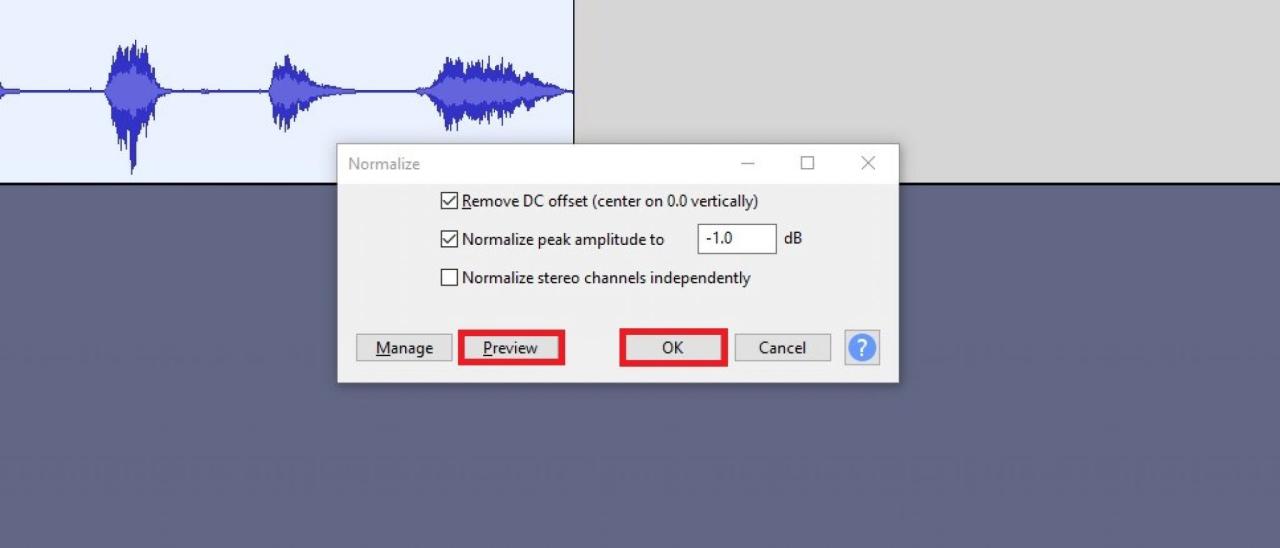
- Access the Normalize effect. Navigate to Effect > Normalize in the top menu. This opens the normalization dialog box.
- Configure normalization settings. In the dialog box:
- Ensure that the “Remove DC Offset” box is checked to eliminate any baseline shifts.
- Set the Peak Amplitude to a target level, commonly
-1.0 dB
or
-0.5 dB
to prevent clipping in subsequent processing.
- Typically, leave “Normalize stereo channels independently” unchecked unless working with stereo tracks that require separate normalization.
- Apply normalization. Click OK to process the audio. Audacity will adjust the volume so that the loudest peak reaches your specified level.
- Review and finalize. Play back the normalized track to ensure levels are consistent and that no unwanted artifacts are introduced. Save the file with File > Export.
Using normalization in Audacity effectively prevents clipping while maximizing loudness, ideal for podcasts or voice recordings requiring uniform volume. Be cautious to avoid over-normalization, which can cause distortion or reduce dynamic range.
Normalizing audio in Adobe Audition
Adobe Audition offers advanced controls for audio normalization, allowing precise adjustments suited for professional audio editing workflows. The process involves analyzing and setting the peak level of the audio file to meet your desired loudness standards.
- Open your audio file in Adobe Audition. Launch the software and open your project or import the audio via File > Open or dragging the file into the workspace.
- Select the entire track for normalization. Click on the waveform display or press Ctrl + A (Windows) / Cmd + A (Mac) to select the whole clip.
- Access the Normalization process. Navigate to Favorites > Normalize to Specific Peak… or go through Amplitude > Normalize in the menu bar, depending on your version of Audition.
- Set normalization parameters. In the dialog box:
- Input your target peak level, such as
-1.0 dB
. This ensures the loudest peak hits the specified level without clipping.
- Check the option Normalize all channels equally to maintain stereo balance.
- Use the “Peak” normalization mode, which adjusts the volume based on the highest peak in the track.
- Input your target peak level, such as
- Execute normalization. Click OK. Adobe Audition processes the audio, adjusting volume levels accordingly.
- Verify and export. Play back the normalized audio to confirm proper levels. Save your work via File > Save As or export to your preferred format.
Adobe Audition’s precise normalization capabilities are suitable for professional audio projects, ensuring compliance with loudness standards such as Broadcast or streaming platforms. Avoid excessive normalization to preserve audio dynamics and avoid distortion.
Common pitfalls and best practices in audio normalization
While normalization is a straightforward process, several common pitfalls can compromise audio quality if not carefully managed. Awareness of these issues helps prevent undesirable outcomes and ensures optimal results.
- Over-normalizing resulting in clipping or distortion. Always set peak levels sufficiently below 0 dB (e.g., -1 dB) to leave headroom, especially if further processing like compression or limiting is planned.
- Ignoring dynamic range. Normalization adjusts volume uniformly, which might reduce perceived audio quality if the original recording has excessive loudness variation. Combine normalization with compression for balanced dynamic control.
- Applying normalization multiple times. Repeated normalization can cumulatively raise noise floor or introduce artifacts. Normalize once after final edits for best results.
- Neglecting to preview the audio after normalization. Always listen to the processed file to detect any unintended distortions or issues that require adjustments.
Following these best practices ensures that normalization enhances the audio quality without degrading the listening experience, leading to polished and professional results across various applications.
Tools and Software for Audio Normalization
Efficient audio normalization requires the right tools to ensure sound levels are consistent and meet specific standards. Various software options are available, ranging from free open-source programs to professional paid solutions, each offering different features suited to different user needs. Selecting the appropriate tool can significantly streamline the normalization process, whether for personal projects, podcast production, or professional audio editing.
In this section, we explore a curated list of popular audio normalization tools, highlighting their key features, supported formats, and usability factors. Additionally, a comparison table is provided to help users make informed decisions based on their specific requirements, budget, and technical expertise.
Free and Paid Software Options for Audio Normalization
The landscape of audio normalization tools includes several widely used applications catering to different levels of proficiency and functionality. These tools are designed to handle various audio formats and offer features such as batch processing, integration with editing workflows, and user-friendly interfaces.
- Audacity
- Adobe Audition
- Reaper
- Levelator
- iZotope RX
Open-source and free, Audacity is a popular digital audio editor that includes normalization features. Its key advantages are an intuitive interface, extensive format support, and a suite of editing tools. Audacity supports formats like WAV, MP3, OGG, and more, making it suitable for both beginners and experienced users.
A professional-grade paid software that provides advanced normalization options alongside comprehensive editing capabilities. Adobe Audition supports a wide array of formats, including WAV, AIFF, MP3, and others. Its user interface is streamlined, and it offers batch processing, automatic loudness normalization, and detailed level adjustments, making it ideal for audio engineers and content creators.
This digital audio workstation offers robust normalization tools within a versatile editing environment. Reaper supports numerous formats and is known for its customizable workflow. Although it requires a license purchase, it provides a free trial and is favored for its affordability and extensive feature set.
A free, simple tool designed specifically for audio levelling and normalization, often used in podcast production. It automatically adjusts volume levels to produce a balanced sound, supporting formats like MP3 and WAV. Its ease of use appeals to non-technical users seeking quick results.
A professional audio repair and normalization suite, offering precise loudness normalization, noise reduction, and audio restoration tools. It supports a broad range of formats and is favored in professional audio post-production, podcast editing, and broadcasting environments.
Comparison Table of Audio Normalization Tools
The following table summarizes key aspects of each software, helping users compare options based on cost, features, and platform compatibility.
| Software | Cost | Features | Platform Compatibility |
|---|---|---|---|
| Audacity | Free | Normalization, multi-format support, batch processing, extensive editing tools | Windows, macOS, Linux |
| Adobe Audition | Subscription-based (monthly/annual) | Advanced loudness normalization, multitrack editing, automation | Windows, macOS |
| Reaper | Paid (with free trial) | Customizable workflow, batch normalization, multi-format support | Windows, macOS, Linux (via Wine) |
| Levelator | Free | Automatic levelling and normalization, simple interface | Windows, macOS |
| iZotope RX | Paid (various licenses) | Precise loudness normalization, noise reduction, restoration | Windows, macOS |
Choosing the right tool depends on specific user needs. For beginners or casual users, free options like Audacity or Levelator may suffice, offering straightforward normalization processes. Professionals requiring detailed control and advanced features might prefer Adobe Audition or iZotope RX, despite their higher costs. Consider factors such as supported formats, ease of use, processing speed, and integration with existing workflows when making a selection.
Best practices for maintaining audio quality during normalization
Achieving optimal audio normalization requires meticulous attention to detail to ensure that the overall sound quality remains intact while attaining the desired loudness levels. Maintaining audio fidelity involves implementing strategies that prevent common issues such as clipping or distortion, especially when working with multiple tracks or complex audio sessions. Proper techniques not only enhance the listening experience but also preserve the integrity of the original recordings.
Normalization is a vital process in audio post-production, but it must be carried out with care to avoid degrading the audio quality. This involves applying specific procedures and checks throughout the normalization workflow, emphasizing the importance of balanced audio levels, precise adjustments, and thorough listening tests before finalizing the output.
Procedures to Prevent Clipping or Distortion
Clipping occurs when the audio signal exceeds the maximum headroom supported by the digital system, resulting in harsh, unpleasant distortion. To prevent this during normalization:
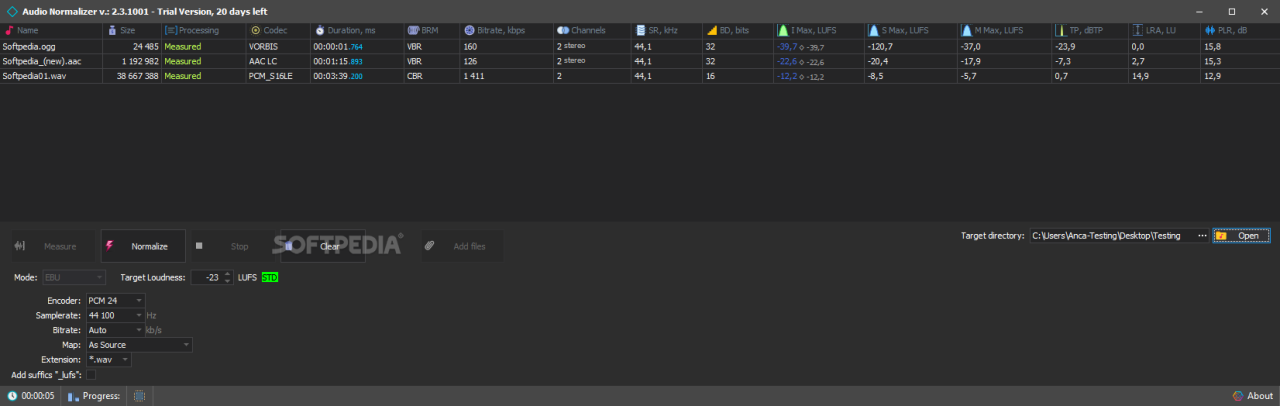
- Monitor peak levels continuously, ensuring they do not surpass 0 dBFS. Use meters with peak and RMS readings to gauge both immediate peaks and average loudness.
- Apply gentle gain adjustments rather than aggressive boosts, especially on tracks with already high levels, to avoid pushing signals into clipping territory.
- Use limiters or soft clipping tools as a safeguard. These tools can cap peaks that threaten to distort, allowing you to set a ceiling that prevents digital overshoot.
- Implement incremental changes, checking levels after each adjustment, rather than making large jumps that could inadvertently introduce clipping.
Maintaining headroom is essential: keep peaks below -1 dBFS to ensure safety margins for subsequent processing or broadcasting.
Balancing Multiple Audio Tracks Before Normalization
When working with multi-track recordings or playlists, balancing the individual tracks is crucial to achieve a cohesive final sound. Proper pre-normalization adjustments help prevent some tracks from overpowering others or becoming inaudible:
- Adjust individual track volumes to ensure consistent perceived loudness across all sources, using RMS or LUFS measurements as a guide.
- Apply equalization (EQ) to correct frequency imbalances before normalization, ensuring that no particular frequency range dominates or gets masked after loudness adjustment.
- Address dynamic range differences by applying compression selectively to tracks that are overly dynamic, thus preventing extreme variations from becoming problematic during normalization.
- Maintain consistency in stereo imaging and spatial placement, ensuring that normalization does not cause phase issues or imbalances between channels.
Balancing audio tracks beforehand creates a more natural and professional final output, reducing the need for excessive normalization adjustments that could compromise sound quality.
The Importance of Listening Tests Post-normalization
Even with precise technical adjustments, the final test of audio quality relies on thorough listening evaluations. Post-normalization listening is vital to detect issues that measurement tools may not reveal, such as subtle distortions, phase problems, or artifacts introduced during the processing:
- Use high-quality headphones or studio monitors in a controlled environment to assess the audio clarity, tonal balance, and absence of unwanted noise or distortion.
- Listen at various volume levels to ensure consistency and identify any anomalies that become more evident at different listening levels.
- Compare the normalized audio against the original unprocessed tracks to verify that the essence and nuances of the sound are preserved.
- Solicit feedback from multiple listeners with diverse hearing sensitivities to gather comprehensive insights about the audio quality.
Incorporating systematic listening tests into your workflow helps ensure that the normalized audio maintains its intended quality, providing a professional and listener-friendly final product.
Quality Assurance Steps for Audio Normalization
To uphold high standards during normalization, implement a series of quality assurance (QA) steps that verify the integrity of the process:
- Verify peak levels and loudness metrics after normalization to confirm adherence to target specifications.
- Conduct a visual inspection of waveforms and meters for signs of clipping or unnatural leveling.
- Perform multiple listening sessions across different playback systems to detect subtle issues or artifacts.
- Compare before and after versions to ensure no unintended modifications or degradation occurred.
- Document all settings and adjustments made during normalization for reproducibility and future reference.
- Implement a checklist that covers technical criteria (peak levels, loudness, phase coherence) and subjective quality (clarity, balance, naturalness).
Systematic QA procedures reduce the risk of errors, ensuring the final audio meets professional standards and client expectations.
Common issues and troubleshooting

Normalization is a crucial step in audio editing to ensure consistent volume levels across recordings, but it often presents challenges that can impact audio quality and listener experience. Recognizing these common issues early allows for effective troubleshooting and optimal results in your audio projects. This section explores typical problems encountered during normalization, provides detailed troubleshooting steps, illustrates how improper normalization affects playback, and offers practical tips for correcting errors.Audio normalization, if not executed correctly, can lead to several issues such as volume inconsistencies, audio distortion, or loss of dynamic range.
These problems often arise due to improper application of normalization techniques, incorrect settings, or incompatible software. Understanding these issues enables sound engineers and hobbyists alike to maintain high audio standards and deliver professional-sounding content.
Volume inconsistency across multiple audio clips
Volume inconsistency is one of the most frequent problems faced during normalization. When clips are normalized separately without considering their original levels or context, some may end up significantly louder or quieter than others, disrupting the seamless listening experience. Troubleshooting steps:
- Verify that normalization is applied uniformly across all clips. Use batch processing features when available to maintain consistency.
- Check the normalization mode being used—peak normalization may not account for perceived loudness differences, so consider using loudness normalization for more uniform audio levels.
- Audibly compare clips after normalization to identify discrepancies. Use calibrated monitors or headphones for accurate assessment.
- If discrepancies persist, manually adjust the gain of individual clips after normalization to match target loudness levels.
- Ensure no compressor or limiter settings are unintentionally altering the levels during or after normalization.
Impact of improper normalization on audio playback:Incorrect normalization can cause some parts of the audio to be excessively loud, leading to listener fatigue or discomfort, while others may be too quiet, making speech unintelligible. For example, a podcast episode normalized without considering dynamic range might have loud segments that distort speakers’ voices, or quieter segments that require the listener to increase volume excessively, increasing the risk of background noise or distortion.
Clipping and distortion due to aggressive normalization
Applying normalization settings that push audio levels beyond the maximum limit can result in clipping, which distorts the sound by cutting off peaks and reducing audio fidelity. This often occurs when users set the normalization to a very high level without monitoring the output. Troubleshooting steps:
- Monitor the peak levels during normalization to ensure they do not exceed 0 dBFS, the maximum ceiling for digital audio.
- Use visual meters within your software to observe peak levels in real-time, adjusting normalization gain accordingly.
- Apply a soft limiter after normalization if you notice occasional peaks that approach or exceed 0 dBFS.
- Test the audio on different playback systems to identify subtle distortions that may not be evident on studio monitors.
Effects of improper normalization:Clipping introduces harsh, unpleasant sounds, diminishes audio clarity, and can permanently damage audio quality. For instance, a music track normalized improperly may have distorted vocals and muffled instruments, detracting from the listening experience and requiring reprocessing.
Incorrect application of normalization algorithms
Using inappropriate normalization methods for specific audio content can lead to suboptimal results. For example, peak normalization on a highly dynamic recording may not achieve desired loudness levels, or loudness normalization might not suit certain types of audio with uneven dynamic ranges. Troubleshooting steps:
- Select the normalization method best suited for your project—peak normalization for technical consistency or loudness normalization for perceptual consistency.
- Use preview features to assess how the normalization affects the audio before applying it globally.
- Adjust normalization parameters based on the content type—speech, music, or effects—to preserve natural dynamics.
- Document your normalization settings for future reference and consistency across projects.
Impact of improper normalization algorithms:Applying an unsuitable algorithm can flatten dynamic ranges, making audio sound unnatural or overly processed. For example, overly aggressive loudness normalization on a live concert recording might diminish the sense of space and energy, resulting in a less engaging listening experience.
Effective troubleshooting ensures that normalization enhances audio quality without introducing artifacts or inconsistencies, maintaining professional standards throughout your editing process.
Wrap-Up
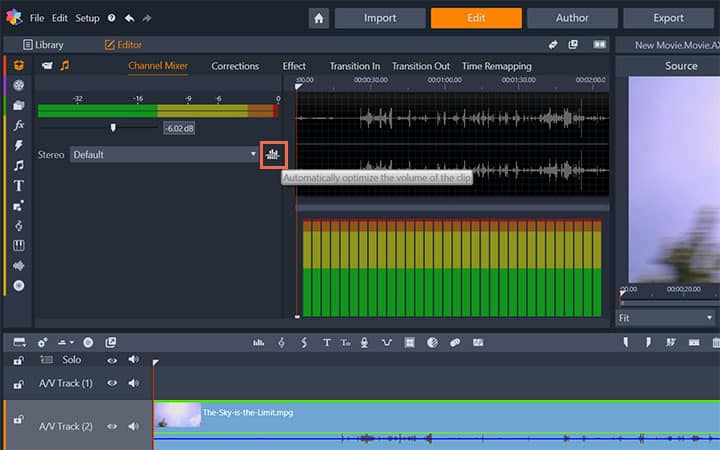
In conclusion, mastering how to normalize audio allows creators to deliver polished and balanced sound content. By selecting appropriate methods and tools, and adhering to best practices, you can significantly improve audio quality and listener satisfaction. Proper normalization not only elevates your audio production but also ensures a professional standard across all your projects.