Mastering how to manage a video crew is essential for ensuring smooth and successful production processes. Effective management not only streamlines workflows but also fosters collaboration and creativity among team members. Whether you are overseeing a small project or a large-scale production, understanding the key principles of team coordination and leadership can significantly impact the final outcome.
This guide explores essential strategies for organizing, leading, and coordinating a video crew. From pre-production planning to post-production supervision, it provides practical insights to optimize each stage of your project while maintaining high team morale and productivity.
Fundamentals of Managing a Video Crew
Managing a video crew involves orchestrating a diverse team of professionals to produce high-quality content efficiently and cohesively. Effective management ensures that each team member understands their roles, responsibilities, and how their work contributes to the overall project. By establishing clear communication channels and a structured workflow, a manager can facilitate a smooth production process, minimize misunderstandings, and deliver a polished final product.
This section explores the core roles within a video crew, best practices for team coordination, and visualizes a typical production workflow to guide effective management.
Understanding the fundamental roles within a video crew is essential for smooth collaboration and project success. Each role carries specific responsibilities that, when coordinated well, form a seamless production pipeline. Clear communication channels are the backbone of team efficiency, reducing errors and ensuring everyone remains aligned throughout the project. Visual workflow charts serve as valuable tools to illustrate the sequence of stages in a typical video production, providing clarity and structure to the entire process.
Essential Roles Within a Video Crew
Every video production requires a multidisciplinary team, with each member fulfilling vital functions to ensure the project’s success. Recognizing these roles helps in assigning responsibilities effectively and fostering collaboration.
- Producer: Oversees the entire project, manages budgets, schedules, and coordinates between clients and the crew. The producer ensures that the production stays on track and aligns with the project’s goals.
- Director: Leads the creative vision, directing actors, camera setups, and overall storytelling. The director communicates the artistic intent and guides the team to realize it.
- Camera Operator: Handles camera operation, framing shots, and capturing visuals according to the director’s vision. They work closely with the director to execute shot compositions.
- Lighting Technician: Designs and implements lighting setups to enhance mood, visibility, and aesthetic quality of the footage. Proper lighting is crucial for visual clarity and style.
- Sound Engineer: Manages audio recording, ensuring high-quality sound capture, and supervises sound mixing during post-production.
- Production Assistant: Supports logistical tasks, manages equipment, and assists other crew members to ensure a smooth workflow.
Best Practices for Establishing Clear Communication
Effective communication is instrumental in preventing misunderstandings and ensuring that each team member is aware of their responsibilities and project updates. Implementing best practices for communication fosters a collaborative environment and promotes efficiency.
- Designate Communication Channels: Use dedicated tools such as Slack, WhatsApp, or project management software to centralize communication and avoid fragmentation.
- Hold Regular Meetings: Schedule daily or weekly briefings to review progress, address concerns, and clarify upcoming tasks. These meetings keep everyone informed and engaged.
- Maintain Documentation: Keep detailed production notes, shot lists, and schedules accessible to all team members. Digitally shared documents ensure transparency and quick reference.
- Encourage Open Dialogue: Foster an environment where team members feel comfortable sharing ideas, feedback, and concerns. This openness promotes problem-solving and innovation.
- Clarify Expectations and Responsibilities: Clearly define each role’s duties and deadlines from the outset. This clarity minimizes overlaps and gaps in the workflow.
Workflow Chart of a Typical Video Production Stage
Visualizing the stages of a video production helps team members understand the sequence of tasks and their interdependencies. Below is a typical workflow Artikel, illustrating the progression from concept to delivery, which is instrumental for effective management.
| Stage | Description | Key Activities |
|---|---|---|
| Pre-Production | Planning and preparation phase where concepts are developed, scripts are written, and logistics are organized. |
|
| Production | The actual shooting phase where footage is recorded according to the planned schedule and storyboard. |
|
| Post-Production | Editing and refining the footage to create the final product. This phase includes visual effects, sound editing, and color grading. |
|
| Distribution | Sharing the completed video through appropriate channels, ensuring it reaches the intended audience effectively. |
|
Integrating these core management principles into your workflow enhances team coordination, optimizes resource use, and ultimately contributes to the successful delivery of your video project.
Pre-Production Planning and Crew Organization
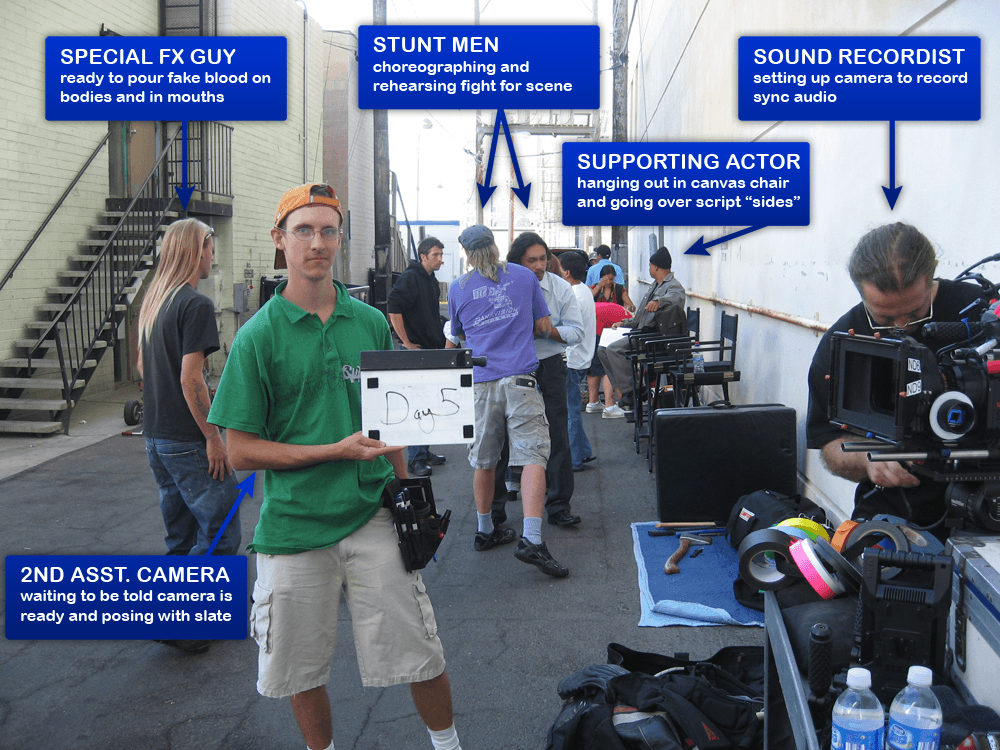
Efficient pre-production planning and clear crew organization are fundamental to the success of any video project. Properly assembling the right team, establishing a detailed schedule, and preparing equipment and logistics set the foundation for smooth filming operations. Ensuring every team member understands their roles and the project timeline minimizes delays and enhances overall productivity, leading to a polished final product.
In this stage, meticulous planning involves identifying project needs, selecting appropriate crew members, and establishing communication channels. It also encompasses detailed scheduling of rehearsals, meetings, and equipment setups, which are critical to aligning expectations and preparing for on-set activities. A well-organized pre-production phase enhances coordination, reduces unforeseen issues during filming, and ensures the project stays within scope and timeline.
Assembling a Video Crew: Checklist
Creating a tailored crew for a video project requires careful consideration of the project’s scope, complexity, and budget. The following checklist ensures all essential roles are covered, and the team is aligned with project demands:
- Define project scope and production requirements to determine crew size and specialized roles
- Identify key roles: director, producer, cinematographer, sound technician, production assistants, and art department
- Select crew members with relevant experience and skill sets matching your project needs
- Confirm availability and commitment of crew members for the entire project duration
- Secure necessary permits or legal clearances for crew members, if applicable
- Establish clear communication channels and roles within the team
- Prepare contracts or agreements outlining responsibilities and deliverables
- Arrange for crew transportation, accommodations, and per diems if needed
- Ensure all crew members are briefed on the project vision, schedule, and safety protocols
- Schedule equipment procurement, testing, and logistics to support crew needs
Crew Size Comparison Table for Different Project Scopes
Understanding optimal crew sizes tailored to project scope helps in efficient resource allocation and workflow management. The table below compares different crew sizes and their suitability for various types of projects:
| Crew Size | Project Scope | Key Characteristics | Ideal For |
|---|---|---|---|
| Small (3-5 members) | Short clips, social media content, interviews | Minimal equipment, multi-role team members, fast turnaround | Independent projects, startups, quick-turnaround content |
| Medium (6-15 members) | Corporate videos, short documentaries, promotional videos | Specialized roles, dedicated teams for key functions | Mid-sized productions requiring coordination of multiple departments |
| Large (16+ members) | Feature films, comprehensive commercials, event coverage | Extensive logistics, multiple departments, complex setups | High-budget productions needing detailed organization and large teams |
Scheduling Rehearsals, Meetings, and Equipment Setups
Thorough scheduling of rehearsals, meetings, and equipment setups is essential to ensure the production runs seamlessly. Establishing a clear timeline helps coordinate the various phases of pre-production and prepares the crew for on-set activities:
- Rehearsals: Schedule rehearsals well in advance of filming dates, especially for complex scenes or performances. Rehearsals allow actors, talent, and crew to familiarize themselves with the shot sequences, blocking, and timing. For projects with multiple takes, rehearsals can significantly reduce filming time and improve performance quality.
- Meetings: Conduct pre-production meetings to review the shooting schedule, safety procedures, and logistical considerations. Regular check-ins during the planning phase help address potential issues proactively and ensure all team members are aligned with project goals.
- Equipment Setups: Allocate specific times for equipment testing and setup prior to filming. Early setup reduces the risk of technical issues during shooting. For complex setups involving lighting, sound, and camera rigs, preparing in advance allows for troubleshooting and adjustments without disrupting the filming schedule.
Proper scheduling of rehearsals, meetings, and equipment setups contributes significantly to a well-organized production, saving time and resources while enhancing overall quality.
Leadership and Team Management Techniques
Effective leadership and team management are essential components of a successful video crew. They ensure that each team member remains motivated, conflicts are resolved efficiently, and diverse personalities and skill levels are harmonized to produce high-quality content. Cultivating strong leadership skills fosters a positive work environment, enhances productivity, and helps navigate the dynamic challenges that arise during video production.
Implementing proven management techniques involves understanding individual motivations, establishing clear communication channels, and creating a collaborative atmosphere. These strategies not only improve team cohesion but also empower crew members to perform at their best, ultimately contributing to the overall success of the project.
Setting Expectations and Motivating Crew Members
Clear communication of roles, responsibilities, and project goals is fundamental to setting expectations within a video crew. When each member understands their specific tasks and how they contribute to the overall vision, it fosters accountability and a sense of purpose. Regular briefings and written documentation can reinforce these expectations and serve as reference points throughout production.
Motivation can be nurtured through recognition, constructive feedback, and creating an inclusive environment where crew members feel valued. Offering opportunities for skill development and involving team members in decision-making processes can also boost morale and engagement. Techniques such as setting achievable milestones, celebrating small wins, and maintaining open dialogue contribute to sustained enthusiasm and productivity.
Resolving Conflicts and Handling Unexpected Issues
Conflicts and unforeseen problems are inevitable in fast-paced production settings. Establishing a structured process for conflict resolution ensures issues are addressed swiftly and constructively. This process typically involves identifying the root cause, encouraging open communication, and mediating with fairness. Emphasizing respect and shared objectives helps de-escalate tensions and promotes mutual understanding.
Handling unexpected issues during shoots requires adaptability and proactive problem-solving. Developing contingency plans for common scenarios—such as equipment failure or scheduling delays—can minimize disruptions. Assigning a point person responsible for troubleshooting and maintaining a calm, solution-oriented mindset helps keep the crew focused and reduces stress in challenging moments.
Managing Diverse Personalities and Skill Levels
Video crews often comprise individuals with varying personalities, communication styles, and expertise. Successful management involves recognizing these differences and fostering an environment of mutual respect. Tailoring communication approaches to suit individual preferences and providing clear instructions helps ensure clarity and cooperation.
Training and mentorship are key to elevating skill levels within the team. Pairing less experienced crew members with seasoned professionals promotes knowledge sharing and confidence-building. Encouraging collaboration and emphasizing the value of diverse perspectives can enhance creativity and problem-solving capabilities. Additionally, establishing a culture that appreciates individuality and promotes inclusivity leads to a more harmonious and productive work environment.
Equipment and Resource Management
Proper management of equipment and resources is crucial for the smooth execution of any video production. Ensuring that all necessary tools are available, well-maintained, and efficiently allocated minimizes delays and technical issues, ultimately contributing to the success of the project. Effective resource management also involves tracking usage, maintaining inventory, and swiftly addressing unforeseen technical problems that may arise during filming.Efficient equipment and resource management requires meticulous planning, clear responsibility assignment, and a proactive approach to troubleshooting.
By establishing organized systems and leveraging technology, production teams can significantly reduce downtime and ensure that all technical aspects of filming operate seamlessly.
Essential Equipment and Supplies for Different Production Types
Different types of video productions demand tailored equipment and supplies to meet their unique requirements. For instance, a corporate interview shoot may necessitate high-quality cameras, lapel microphones, and portable lighting, while a cinematic production might require a variety of camera lenses, dollies, cranes, and advanced lighting setups.Below is a comprehensive list of essential equipment categorized by production type:
| Production Type | Essential Equipment | Supplies |
|---|---|---|
| Corporate/Interviews |
|
|
| Cinematic/Film |
|
|
| Event Coverage |
|
|
Assigning Equipment Responsibilities and Maintaining Inventory Logs
Clear assignment of equipment responsibilities ensures accountability and organized handling of resources throughout the production process. Designating a dedicated equipment manager or crew member responsible for inventory control fosters consistency in tracking and maintenance.Maintaining detailed inventory logs involves documenting each piece of equipment’s status, location, and usage history. This practice minimizes loss, facilitates quick retrieval, and simplifies troubleshooting. A sample inventory log can be organized in a table format as follows:
| Equipment Item | Serial Number / ID | Assigned To | Date Checked Out | Condition | Return Date | Notes |
|---|---|---|---|---|---|---|
| Camera A | SN12345 | John Doe | 2024-04-15 | Good | 2024-04-20 | Battery replaced |
| Microphone Set | SN67890 | Jane Smith | 2024-04-15 | Good | 2024-04-20 | Minor cable wear |
Regularly updating the inventory log and conducting physical audits at key stages of production ensure resource tracking accuracy. Employing digital inventory management tools or spreadsheets can streamline this process, providing real-time data access and reporting capabilities.
Procedures for Troubleshooting Technical Issues During Filming
Technical issues can disrupt the filming schedule and compromise content quality. Establishing standardized troubleshooting procedures enables crew members to respond swiftly and effectively to common problems.A systematic approach includes:
Step 1: Identify the Issue – Determine whether the problem is hardware, software, or connection-related. For example, audio dropouts, video signal loss, or battery failures.
Step 2: Isolate and Test – Check connections, power sources, and settings. Replace cables or batteries to verify if the problem persists.
Step 3: Implement Solutions – Reset devices, update firmware if applicable, or switch to backup equipment. Use spare gear to maintain continuity.
Step 4: Document and Report – Record the issue and the solution applied for future reference and to inform maintenance planning.
For instance, if a camera refuses to power on, the crew should first verify power connections, replace batteries, and check for firmware updates. Having a designated technical support team or individual on set ensures prompt assistance. Additionally, maintaining a toolkit with necessary repair supplies, such as spare cables, batteries, and cleaning tools, can expedite problem resolution.Proactive troubleshooting and clear procedures help minimize downtime and ensure that technical setbacks do not compromise the overall production quality.
On-Set Coordination and Workflow Optimization
Effective on-set coordination is critical to ensuring a seamless filming process, minimizing delays, and maintaining high-quality production standards. Properly overseeing daily operations involves meticulous planning, clear communication, and proactive management of crew activities. By optimizing workflow and coordinating crew movements efficiently, production teams can significantly reduce downtime and ensure that filming sessions proceed smoothly from start to finish.
Implementing structured workflows and real-time coordination strategies helps manage unforeseen challenges, keeps everyone aligned on objectives, and maximizes overall productivity. This process requires a combination of detailed planning, precise execution, and adaptive leadership to respond to dynamic on-set conditions effectively.
Overseeing On-Set Operations for Smooth Filming Sessions
Managing on-set operations involves a step-by-step approach to ensure all aspects of filming are executed efficiently. The key steps include:
- Pre-Session Briefing: Conduct a comprehensive briefing with the crew to review the shooting schedule, scene priorities, and safety protocols. Clarify roles and expectations to prevent confusion during filming.
- Set Up and Equipment Checks: Ensure all equipment, props, and set elements are correctly positioned and functioning. This reduces technical delays during shooting.
- Crew Movements Coordination: Assign specific pathways for crew members to avoid congestion, especially around the camera and lighting setups. Use walkie-talkies or headsets for instant communication.
- Scene Breakdown and Shot Rehearsals: Break down each scene into individual shots, verify shot setups, and rehearse with actors and crew to identify potential issues beforehand.
- Real-Time Monitoring and Adjustments: Continuously observe on-set activities, address any technical or logistical problems promptly, and adapt schedules as needed to stay on track.
Guidelines for Directing Crew Movements and Shot Setups
To maximize efficiency and maintain high production quality, crew movements and shot setups should follow clear guidelines:
- Designated Pathways: Establish and communicate specific pathways for crew to move around the set, avoiding interference with camera lines and lighting rigs.
- Staging and Blocking: Coordinate with the director and actors to finalize blocking early, ensuring that camera angles and lighting are optimized for each shot.
- Time Allocation: Allocate specific time slots for each setup, rehearsals, and shooting to prevent overruns and maintain the shooting schedule.
- Efficient Equipment Use: Position equipment strategically to minimize the need for repositioning, and pre-assemble gear to expedite setup times.
- Clear Communication: Use visual signals and communication devices to direct crew movements, ensuring everyone understands their roles and timing.
Shot Lists, Scene Breakdowns, and Crew Task Assignments
Organizing shot lists and scene breakdowns is essential for clarity and efficiency. The following table illustrates how to structure these elements alongside crew task assignments:
| Shot Number | Scene/Location | Description | Camera Angle | Lighting Setup | Cast Movements | Crew Tasks |
|---|---|---|---|---|---|---|
| 1 | Living Room – Scene 3 | Close-up of protagonist reading a letter | Over-the-shoulder | Soft key light with fill | Actor seated, reading | Camera operator, focus puller, gaffer, assistant director |
| 2 | Garden – Scene 5 | Wide shot of group walking and talking | Wide angle | Natural daylight with reflectors | Several actors walking towards camera | Camera operator, grip, makeup artist, production assistant |
| 3 | Kitchen – Scene 7 | Medium shot of character cooking | Two-shot | Practical lights with overheads | Actor preparing food at counter | Camera operator, gaffer, wardrobe, sound technician |
For each shot, clearly assign tasks such as camera operation, lighting, set adjustments, and performer cues. Maintaining an updated shot list and scene breakdown ensures all crew members are aligned, reducing confusion and streamlining transitions between scenes.
Post-Production Supervision and Delivery
Effective management of post-production processes is essential to ensure that the final video product meets quality standards, client expectations, and delivery deadlines. This phase involves coordinating editing schedules, overseeing review procedures, maintaining quality control, and establishing clear communication with stakeholders to facilitate a smooth final delivery. Proper supervision during post-production serves as the bridge between the creative vision and the final output, emphasizing the importance of organization, communication, and quality management.Post-production supervision requires meticulous planning and coordination among various team members, including editors, colorists, sound designers, and client representatives.
Establishing a comprehensive workflow and timeline helps prevent delays and ensures that each stage of editing and review aligns with project goals. Moreover, implementing systematic quality control measures guarantees that technical standards and creative integrity are maintained throughout the process. Effective communication with stakeholders during review and approval phases fosters transparency and helps align the final product with client expectations.
Managing Editing Schedules, Review Processes, and Quality Control
In the post-production stage, managing editing schedules involves setting clear milestones and deadlines that accommodate revisions and feedback loops. To ensure efficiency:
- Develop a detailed editing timeline that allocates sufficient time for rough cuts, fine edits, sound design, and color grading.
- Assign specific responsibilities to team members, such as lead editors, sound engineers, and colorists, with defined deliverables at each phase.
- Use project management tools to track progress, assign tasks, and monitor upcoming deadlines, reducing the risk of oversights.
Review processes are integral to maintaining quality and alignment with project goals. These should include:
“Structured review sessions facilitate constructive feedback, ensuring revisions are systematically incorporated without compromising the project’s timeline.”
- Schedule regular review meetings with clients and internal teams to evaluate drafts at key milestones.
- Establish clear feedback channels, such as marked-up timelines or annotated review copies, to streamline communication.
- Document all feedback and revisions to maintain an organized record of changes and approvals.
Quality control involves checking for consistency, technical issues, and adherence to the creative brief:
- Conduct technical assessments, such as checking audio synchronization, color accuracy, and video resolution.
- Ensure compliance with broadcast standards or platform-specific specifications, like aspect ratios and file formats.
- Perform final review sessions to verify that the content aligns with the project’s creative and technical standards before delivery.
Post-Production Timeline Template and Crew Responsibilities
A structured timeline template is fundamental for organizing post-production phases and defining crew responsibilities to facilitate smooth workflow management:
| Phase | Duration | Key Activities | Responsible Crew Members |
|---|---|---|---|
| Initial Assembly and Rough Cut | 1-2 weeks | Import footage, organize media, assemble initial edit | Editor, Assistant Editor |
| Fine Editing and Sound Design | 2-3 weeks | Refine cuts, add sound effects, music synchronization | Lead Editor, Sound Designer |
| Color Correction and Visual Effects | 1-2 weeks | Color grading, VFX integration, visual consistency | Colorist, VFX Artist |
| Review and Revisions | 1-2 weeks | Client feedback incorporation, final adjustments | Editor, Client Liaison |
| Final Output and Delivery | 3-5 days | Rendering, format conversion, delivery preparation | Editor, Producer |
Clear delineation of responsibilities ensures accountability and smooth coordination. Assigning specific tasks to respective team members at each phase minimizes delays and enhances workflow efficiency.
Coordinating Client Feedback and Final Delivery with Stakeholders
Timely and organized communication with clients and stakeholders is vital to reach consensus and ensure satisfaction with the final product:
- Establish predefined review milestones aligned with the post-production timeline, allowing stakeholders to provide feedback systematically.
- Use collaborative review platforms or shared drives where stakeholders can view drafts, annotate comments, and track revisions efficiently.
- Schedule regular update meetings or calls to discuss progress, clarify feedback, and address concerns promptly.
- Maintain a revision log documenting all client feedback, implemented changes, and pending tasks to ensure transparency and accountability.
- Coordinate final approval by obtaining formal sign-offs before the final delivery, ensuring all stakeholders are aligned and satisfied with the finished product.
- Plan delivery formats and channels, such as digital files, DVDs, or streaming platforms, based on client preferences and project requirements.
Effective coordination and clear communication during this phase help to meet deadlines, enhance client satisfaction, and uphold professional standards in the final delivery process.
Building a Cohesive and Efficient Crew

Creating a unified and effective video production team is fundamental to ensuring smooth operations, high-quality output, and a positive working environment. A well-coordinated crew not only enhances productivity but also fosters creativity and morale, which are crucial for the success of any project. Cultivating such an environment requires strategic recruitment, ongoing team development, and fostering camaraderie among members.
Effective team building involves selecting skilled professionals who align with the project’s needs and establishing a culture of collaboration and mutual respect. This section explores proven techniques for recruiting talented crew members, implementing team-building activities, and designing ongoing training initiatives. Additionally, a comparative overview of onboarding processes tailored to different project types offers practical insights for integrating new team members efficiently and smoothly.
Recruitment of Skilled Crew Members and Fostering Team Camaraderie
Attracting highly competent crew members begins with clear job descriptions that specify required technical skills, experience levels, and cultural fit. Utilizing industry networks, professional associations, and social media platforms can expand recruitment outreach. Collaborations with film schools and industry workshops also serve as excellent avenues for discovering emerging talent.
Once recruited, fostering camaraderie is essential for a cohesive team. Techniques include encouraging open communication, promoting shared goals, and recognizing individual contributions. Creating a positive work environment where members feel valued enhances collaboration and reduces conflicts, leading to greater efficiency and morale.
Team-Building Activities and Ongoing Training Initiatives
Building team spirit and enhancing skills through targeted activities and training are vital for maintaining a motivated crew. Effective activities include:
- Workshops and Cross-Training Sessions: Regularly scheduled sessions where crew members learn each other’s skills, such as camera operation, lighting, or editing techniques, fostering versatility and understanding.
- Team-Building Exercises: Activities like problem-solving challenges, outdoor retreats, or collaborative projects that promote trust and communication among team members.
- Celebrating Achievements: Recognizing milestones, such as completing a challenging shoot or achieving technical proficiency, boosts morale and encourages ongoing dedication.
Ongoing training initiatives include industry-standard certifications, technical skill upgrades, and soft skills development such as leadership and conflict resolution. These initiatives ensure the crew remains current with technological advancements and industry best practices, ultimately elevating the quality of the final production.
Comparison of Onboarding Processes for New Crew Members Across Different Project Types
Onboarding procedures vary significantly depending on the project scope and complexity. Below is a comparative table illustrating onboarding approaches for feature films, commercials, and corporate videos:
| Project Type | Pre-Arrival Preparation | Orientation Program | Training & Integration | Duration |
|---|---|---|---|---|
| Feature Films | Detailed project briefs, schedule distribution, equipment allocation | Introduction to crew hierarchy, safety protocols, and project goals | Technical training on specialized equipment, location-specific procedures | 1-2 days before filming begins, continuing during initial days |
| Commercials | Briefing on brand guidelines, client expectations, key deliverables | Team introductions, walkthrough of creative concept, safety overview | Focus on fast-paced workflows, quick equipment familiarization | Half-day to 1 day before shoot, with brief ongoing sessions |
| Corporate Videos | Project objectives, client requirements, resource mapping | Team role clarification, safety, and confidentiality policies | Skill refreshers relevant to specific shoot environments | Same-day onboarding on shoot day or day prior, depending on crew size |
This structured approach ensures that crew members are adequately prepared for their specific roles, facilitating seamless integration into the project and promoting overall efficiency and cohesion.
Closing Summary
In conclusion, managing a video crew effectively involves clear communication, strategic planning, and strong leadership. By applying these principles, you can create a cohesive team capable of delivering high-quality content efficiently. Embracing continuous improvement and team development will further enhance your production success and foster lasting professional relationships.